What an STL file is
An STL file describes the surface of a 3D shape as a list of triangles. That is all it holds: no units, no materials and no print settings. Each triangle is three points in space, so a curved surface is approximated by many small flat ones.
The format dates from 1987, and almost every 3D printing workflow still accepts it. You export an STL from a CAD program or download one, and a slicer turns it into instructions for the printer.
There are two kinds, binary and ASCII. They hold the same information; the binary kind is several times smaller. This viewer reads both. It also reads binary files that wrongly begin with the word “solid”, which some programs mistake for ASCII.
How to open an STL file
Drop the file anywhere on this page, or choose it with the button. It opens in your browser on Windows, macOS, Linux, ChromeOS, iPhone, iPad and Android, with nothing to install.
That matters more on Windows than it used to. Microsoft’s 3D Viewer app, which opened STL files for years, was removed from the Microsoft Store on July 1, 2026. Copies that are already installed keep working, but a new PC doesn’t come with it. If you would rather install something, a slicer such as Bambu Studio, PrusaSlicer or Cura also opens STL files. Microsoft 3D Viewer alternatives lists more.
How to measure an STL
Open the file and read the table beside the model.
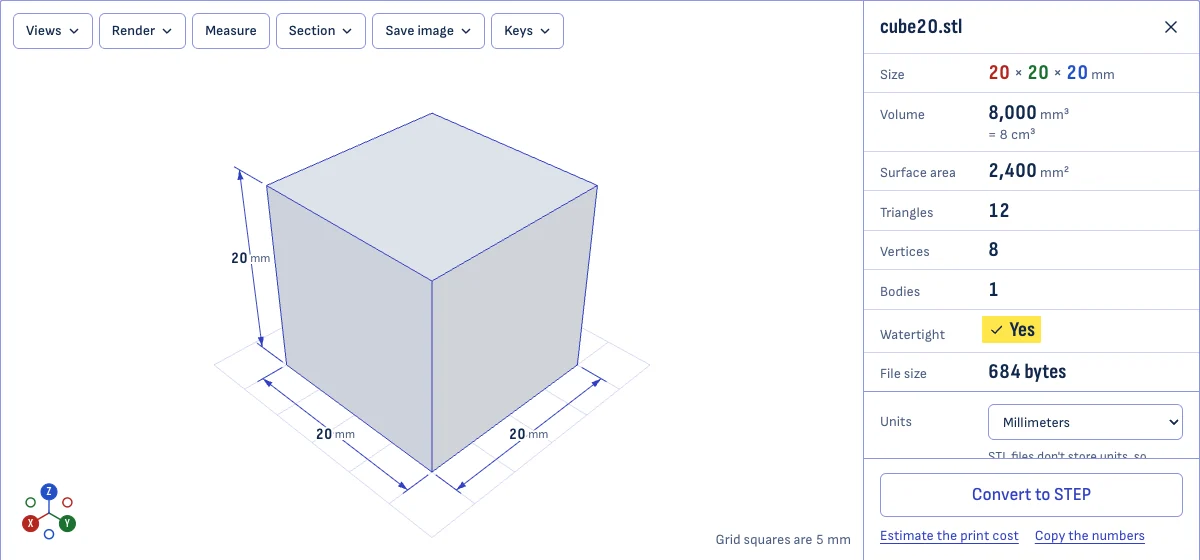
- Size is the bounding box: how far the model reaches along X, Y and Z. The same three numbers are drawn on the model as dimension lines.
- Volume is the space the solid takes up. Multiply it by a material’s density to get the weight.
- Surface area is the total area of all the triangles.
To measure between two points, choose Measure and click twice on the model. A click snaps to the nearest corner, then to the nearest sharp edge, so you can pick the exact end of an edge. You get the straight-line distance and the difference along each axis.
To measure between faces, choose Faces under Measure and click a face. A hole or another round face gives its diameter and radius. Two flat faces give the angle between them, and when they are parallel, the distance between them, such as the thickness of a wall. Two holes side by side give the distance between their axes. An STL holds a round hole as a polygon of flat sides, so its diameter is the circle fitted through their corners, which is the circle the hole was cut from when the corners lie on it.
To see how thick the walls are, choose Thickness and switch the map on. The model is colored by the wall under each place of its surface, measured by a ray from the surface straight into the model to where it comes out: red where the wall is thinner than the least wall of your process (0.8 mm for FDM and 0.5 mm for resin to begin with, or a number you type), blue up to twice that, fading to gray, and a darker gray where no wall was found. The thinnest wall is marked on the model with its thickness, and the panel says how much of the surface is too thin. A ray’s length is a path through the material, so a wall is never read thinner than it is; where its two sides are not parallel it can be read a little thicker. These minimums are a place to start: your printer, nozzle and material decide the real one. Only a closed model facing out is measured, since a ray from an open surface may never come out the other side, and up to 1,000,000 triangles. The map is drawn when the model is shown shaded, with or without its edges.
STL files don’t store units. A slicer assumes millimeters and so does this viewer, but the choice is yours: pick the unit the model was drawn in and every number follows. A model less than 10 units across was probably drawn in inches, and one less than half a unit in meters, as robot parts and scans are: the viewer asks.
How to check an STL before printing
A printable STL is a closed surface: every edge is shared by exactly two triangles. The viewer checks this as soon as the file opens.
- Watertight says whether the surface is closed. If it isn’t, you see how many edges are open and how many holes they form, and those edges are drawn in red on the model.
- Faces appears when some triangles point the wrong way. A flipped triangle shows its red back side.
- Bodies counts the separate shells in the file. More than one may be intended, such as several parts in one file, or it may be a stray fragment.
Volume is only reliable for a closed, correctly oriented mesh, so it is flagged when a check fails. To look inside a model, choose Section and move the cut.
STL, 3MF or STEP
| STL | 3MF | STEP | |
|---|---|---|---|
| Holds | Triangles | Triangles, with units, colors and print settings | Exact surfaces and solids |
| Units | None | Yes | Yes |
| Several parts | Loose shells | Named objects on plates | An assembly |
| Made for | Any slicer | Slicers, to keep a whole print project | CAD programs |
Use STL when the shape only has to reach a slicer. Use 3MF to keep a print project together. Use STEP when someone has to edit the part in CAD.
You can convert a 3MF project to STL or turn an STL into a STEP solid on this site, and save an STL as a 3MF, an OBJ, a GLB, a PLY, an FBX or a USDZ to see it in AR on an iPhone.
Questions
Is it really free and private?
Yes. There is no charge, no account and no limit on how many files you open. The file is read by your own browser and is never sent to a server: the site has nowhere to upload a file to. The page on how your files stay private shows how to check this yourself in your browser's developer tools.
What's the maximum file size?
There is no fixed limit. The file is held in your device's memory, so the limit is the device. On a laptop, a 48 MB file with a million triangles opens in a couple of seconds, and files of a few hundred megabytes work.
Above 5 million triangles the viewer shows a simplified preview first, with the measurements still taken from the full model. Phones have less memory: if a very large file won't open on a phone, open it on a computer.
Why does my model look tiny or huge?
STL files don't store units, so a program has to assume one. Slicers assume millimeters. A model drawn in inches then comes out 25.4 times too small, and one drawn in meters 1,000 times too small.
Choose the unit the model was drawn in under Units. The size is then also shown in millimeters, which is the number your slicer needs.
Can I edit the STL here?
No. This page is for looking, measuring and checking. To change the shape, turn the STL into a STEP solid with the STL to STEP converter and edit that in a CAD program, or open the STL in a mesh editor such as Blender.
Can I save the model as another format?
Yes. The links under the numbers save what is on show as a 3MF, an OBJ, a GLB, a glTF, a PLY, an FBX or a USDZ, named after the file. Several files open at once are saved together, each as a part of one file, and as one STL too. Each format has a page of its own that says what it keeps, such as STL to 3MF and STL to OBJ.
Which other files open here?
OBJ, PLY, GLB and FBX files open in the same viewer, with the same table of numbers. Measure and Section are offered for meshes, as for an STL. A GLB, glTF or FBX model is shown with its own materials and a PLY point cloud has no surface, so those open without them.
STEP, IGES, 3MF, DXF and G-code files dropped on this page open in the tool that reads them, without leaving the page.
What do the red parts of my model mean?
Red marks something to fix. Red lines are open edges: places where the surface has a hole. A red face is the back of a triangle, which you only see when a triangle is flipped or when you are looking into the model through a hole.