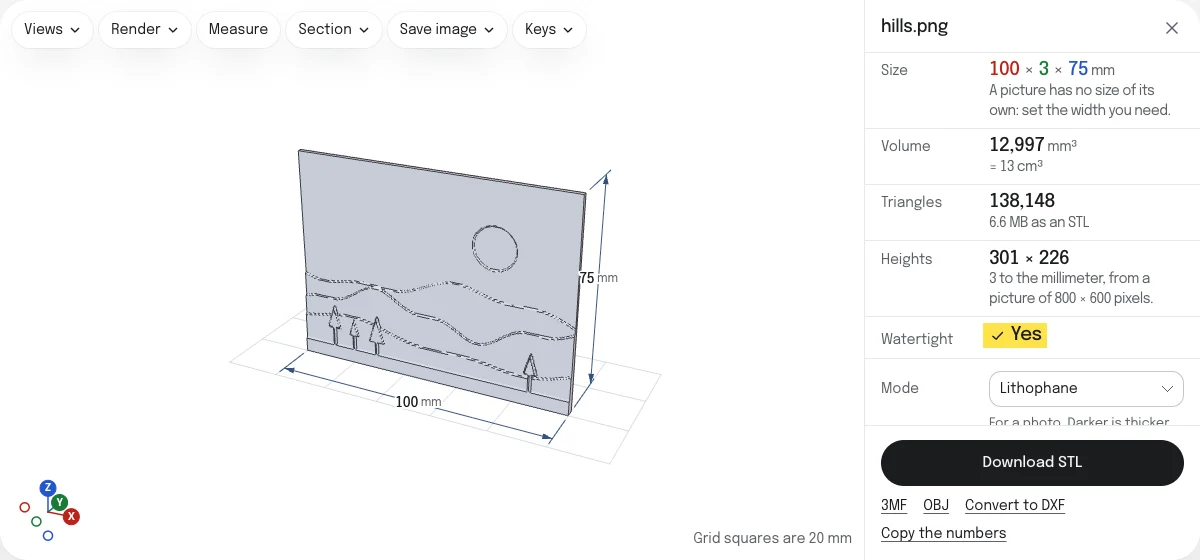
Lithophane, relief or logo: which mode?
One picture can become three different things. Choose under Mode, and the solid is made again at once.
| For | What you get | |
|---|---|---|
| Lithophane | A photo | A thin plate, thicker where the picture is darker. Held to the light, it shows the picture. |
| Relief | A drawing, a map, a height map | A plate whose surface rises with the picture: the light parts highest, or the dark parts. |
| Logo | A logo, an icon, a silhouette | The picture's shapes, traced and raised to one height, on a base plate if you like. |
A picture opens as a lithophane, and after that in the mode you used last. A picture with nothing to trace, such as a page of one color, opens as a lithophane even after a logo, and the page says so.
Color pictures are read by how light each pixel is. See-through parts of a PNG count as white.
Best images for lithophanes
A lithophane has no colors, only thickness. What prints well is a picture that would still read in black and white:
- The whole range from light to dark. A flat, gray picture gives a flat, gray lithophane. Raise the contrast first if the picture looks dull.
- A clear subject. A face lit from the front, a building against the sky, a pet on a plain floor. Busy backgrounds turn into noise.
- Light where it matters. The lightest part of the picture is the thinnest part of the print, and the part that glows.
- Not mostly dark. Dark means thick, and a thick lithophane is slow to print and dim.
Size, thickness and resolution
Type the width of the picture in millimeters, from 1 to 10,000, and the height follows. A picture has no size of its own, so it opens 100 mm wide. A scan or an export that records its resolution (300 pixels to the inch, say) opens at its true size instead, if that is a width within those limits.
For a lithophane:
- Thinnest is the thickness where the picture is white, and Thickest where it is black. They start at 0.8 and 3 mm. The thinnest can be as little as 0.2 mm and the thickest as much as 20 mm.
- Border adds a frame round the picture, as thick as the thickest part, up to 50 mm wide. It makes a thin plate stiffer. The width you type is the picture’s, without the frame.
- Shape is flat, curved or a cylinder. A curved lithophane bends through the angle you set, from 10 to 340°, with the picture on the outside, and its width is measured along the smooth back. On a cylinder the picture goes once around, so the width is the distance around the inside: 200 mm makes a tube 63.7 mm across inside.
For a relief:
- Highest says which parts stand up, the light or the dark.
- Height is the distance from the lowest point to the highest, and Base the thickness under the lowest point.
- Smoothing rounds off steps and noise.
Resolution is how many heights are made to the millimeter, from 0.5 to 10. It starts at 3, a little finer than a 0.4 mm nozzle draws. No more than 400 heights a side are made, which is 318,402 triangles on the picture and an STL of about 15 MB. At 100 mm wide that is just under 4 to the millimeter, and the page says what it comes to when the limit is reached.
A logo has the settings of the PNG to DXF converter for its outline (threshold, smoothing, specks, colors) and those of the SVG to STL converter for its height and base plate. The width you type is that of the traced shapes.
Print settings that work
A lithophane is saved standing on its lower edge, with the picture to the front. That is how to print it:
- Standing up. Printed lying flat, its thickness can only change by whole layers: between 0.8 and 3 mm at 0.2 mm layers that is a dozen shades. Standing, the thickness is drawn by the nozzle’s path and changes smoothly.
- 100% infill. Any infill pattern shows through as a grid when the light is on.
- White or natural filament. PLA is the usual choice.
- A brim. A plate 3 mm thick and 75 mm tall has little to stand on.
A relief and a logo lie flat on their backs and print like any other part.
What is in each download
| What it holds | |
|---|---|
| STL | One closed solid, with no colors. |
| 3MF | The same solid, in millimeters. A logo traced in several colors has a part for each color, each with its color, and the base plate as one more. |
| OBJ | The same solid. A logo in several colors has an object for each color, with a material file for the colors. |
Questions
Is my picture uploaded?
No. The picture is read and the solid is made by your own browser. Nothing is sent to a server, so a family photo or a logo you are not free to share stays on your device.
What size should the image be?
For a lithophane or a relief, 800 to 1,200 pixels on the long side is plenty. The solid is made from at most 400 heights a side, each the average of the pixels it covers, so a larger picture adds nothing you could print. A small picture works too: its pixels are run evenly into each other.
For a logo, larger and sharper is better, because its outline is traced: 1,000 pixels across is a good start.
Why does my lithophane look dark?
Light has to get through its thickest part. Three things help: set Thickest lower, to 2.4 mm or so; print in white or natural PLA, which lets more light through than a color; and put a strong light close behind it.
A picture that is dark all over makes a lithophane that is thick all over. Lighten the picture first, so that its lightest part is close to white.
With no light behind it a lithophane looks like its own negative: the thick parts stand out pale. That is as it should be.
Which way round is the picture?
The right way round, seen from the side with the relief on it, which is the front of the STL. From the flat back it reads mirrored. On a curved lithophane and on a cylinder the picture is on the outside.
Can I make a cookie cutter?
Not in one step. A cookie cutter is a thin wall along the outline of a shape, and the logo mode raises the whole shape.
What works: trace the picture in the PNG to DXF converter and download the SVG. Open it in a drawing program and give the outline a line about 1 mm wide, with no fill. Then raise it in the SVG to STL converter, which raises a line at its own width.
Can I print a logo in several colors?
Yes, with a step in your slicer. Set Colors to the number of colors in the picture, background included, and download the 3MF: it holds a part for each color, and the base plate as one more. Bambu Studio 2.8 opens it as one object with those parts in place, every one on the first filament until you give it another. PrusaSlicer 2.9 opens the parts as separate objects, named after their colors, and sets each down on the bed. Neither takes the colors themselves from the file.
An STL cannot do this. It holds one solid and no colors.
Is the STL ready to slice?
It is checked before it is offered, the way the STL viewer checks any file: for open edges and for edges shared by more than two faces. Watertight is marked Yes only when the check finds none. If it says No, the faulty edges are drawn in red on the model.
Can I get outlines for a laser cutter instead?
Yes. Convert to DXF, under the download, opens the same picture in the PNG to DXF converter, which traces it into outlines for a laser cutter or a CNC machine.