What is kept and what is lost
An STL holds one thing: a surface made of triangles. A 3MF project holds much more, and only part of it has anywhere to go.
| In the STL | |
|---|---|
| Shape of every printable part | Kept, triangle for triangle |
| Size | Kept, written in millimeters |
| Position, rotation and scale of each object | Kept: they are applied to the triangles |
| Negative parts | Cut out of the object they belong to |
| Colors and painted regions | Lost: STL has no color |
| Modifiers, support blockers and enforcers | Left out: they are settings, not geometry |
| Print settings, filaments, plates | Lost, though you can save one STL per plate |
If the next program is a slicer and it can read 3MF, keep the 3MF. Convert when the next program only takes STL, or when it refuses the 3MF you have.
Why some 3MF files won’t open elsewhere
A plain 3MF keeps every object’s triangles in one file inside the archive. Bambu Studio and OrcaSlicer use an official addition to the format, the Production Extension, which lets a project keep each object in a file of its own. The main file then only says “this object is over there”.
That is valid 3MF, but a program has to follow those references to find anything. Several don’t: they open the main file, see objects with no triangles and show an empty scene, or stop with an error. PrusaSlicer 2.9 rejects a Bambu Studio project as an invalid file, and people report the same from Cura with MakerWorld downloads. Many online converters fail the same way.
This converter follows the references, on objects and on build items alike. It also reads what each slicer adds on top of the format: which parts are modifiers, which are negative, which objects sit on which plate, and which ranges of triangles in a PrusaSlicer mesh belong to which part.
What you can choose
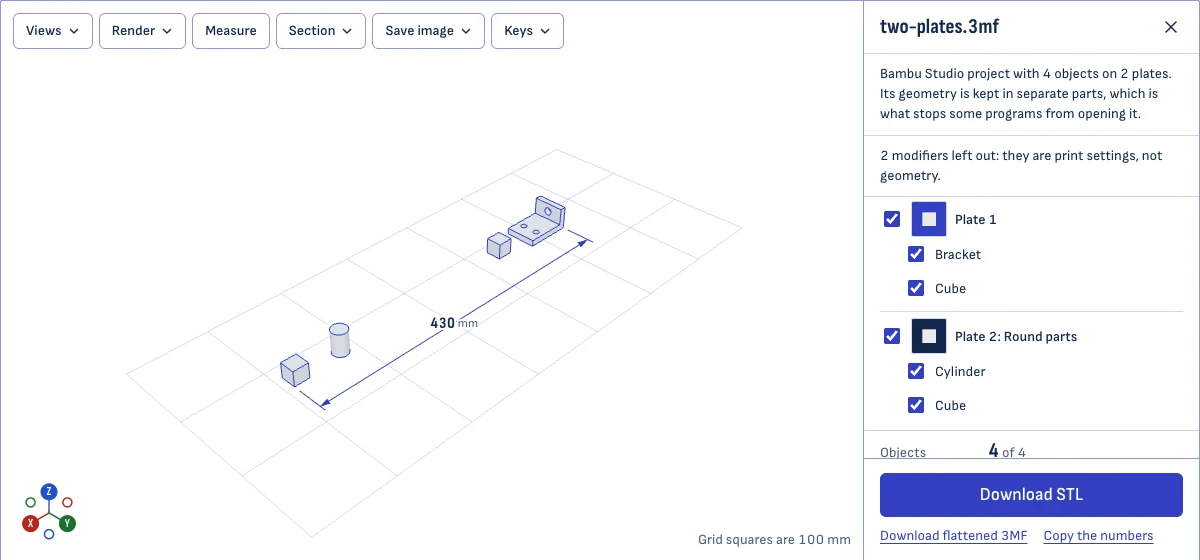
- Plates and objects. Everything printable is selected when the file opens. Untick what you don’t want.
- One file or several. One STL with everything, one STL per object, or one per plate. Several files come as a ZIP.
- Objects marked as not printable. They are listed but not selected, the way the project left them.
- Flattened 3MF. The same objects as a plain 3MF that other slicers open.
The 3D view always shows exactly what the download will hold.
Exporting from the slicer instead
If you have the slicer that made the project, it can write the STL itself.
- Bambu Studio and OrcaSlicer: in the File menu, under Export, choose “Export all objects as one STL” or “Export all objects as STLs”. For a single object, right-click it and choose “Export as one STL”. “Export Generic 3MF” writes a 3MF without the extensions, for other slicers.
- PrusaSlicer: in the File menu, under Export, choose “Export Plate as STL/OBJ”, or right-click an object and choose “Export as STL/OBJ”.
This page gives the same geometry without installing anything, which helps when the file was sent to you or came from MakerWorld and you use a different slicer.
Questions
Will my model keep its size?
Yes. A 3MF states its unit, and the converter writes the STL in millimeters, which is what slicers expect. A file in inches is multiplied by 25.4 on the way, and the page tells you when that happens. If you need the original numbers instead, tick the box to keep the file's units.
Positions are kept too: each object stays where the project placed it on its plate.
What happens to modifiers and supports?
They are left out. A modifier is a shape that marks a region for different print settings; support blockers and enforcers mark where supports may go. None of them is printed, so none belongs in the STL. Bambu Studio's own STL export leaves them out as well.
A negative part is different: it removes material. The converter cuts it out of its object, and tells you if the cut could not be made.
Can I convert only one plate?
Yes. When the project has plates, they are listed with their objects. Untick a plate, or single objects, and the download holds only what is left. You can also get one STL per plate or one per object, zipped together.
Is my file uploaded?
No. The conversion runs in your browser, on your device. The site has nowhere to upload a file to, which is also why a 150 MB project converts without a wait in a queue.
Why does my 3MF open here when another converter failed?
Most likely the file came from Bambu Studio, OrcaSlicer or MakerWorld. Those files keep their geometry in separate parts inside the 3MF and point to them, and a reader that does not follow the pointers finds an empty model. This converter follows them.
What is the flattened 3MF for?
It is the same project written as a plain 3MF: every object as one mesh, in one part, with nothing but the core of the format. PrusaSlicer, which rejects the Bambu Studio project itself, opens the flattened file, and so does any program that reads standard 3MF. Colors, print settings and plates are not carried over.