What a slicer needs from a mesh
A slicer cuts a model into layers and fills the inside of each one. To know where the inside is, it needs a surface that is closed all round and faces out everywhere.
- Closed means that every edge of every triangle is shared by exactly two triangles. An edge with only one is the rim of a hole, and a slicer has to guess where the wall goes on.
- Facing out means that each triangle is stored with its corners in the order that points it away from the inside. A triangle stored the other way round is a “flipped normal”: it tells the slicer that the outside is on its inner side.
A mesh can look perfect on screen and still be neither, because the screen draws both sides of every triangle. The STL viewer shows where a file is open and which faces are flipped. This page repairs it.
What is repaired, and how
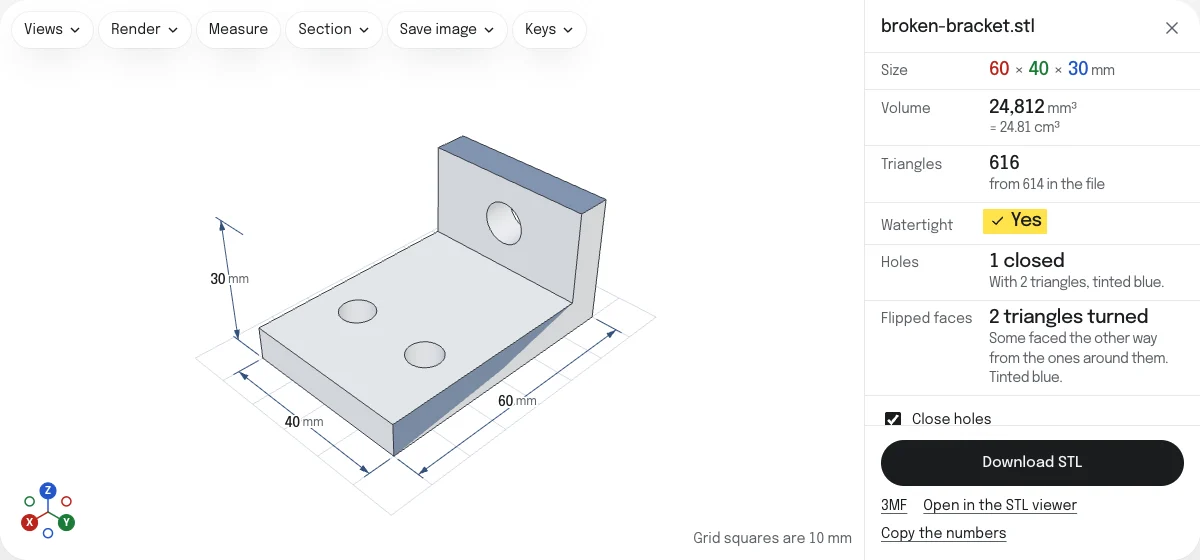
The file is repaired as it opens. Beside the model the page lists what it found and what it did about each kind of fault, and the model is shown as it will be saved: what was added or turned is tinted blue, and anything still open is drawn in red.
- Holes. Each rim of open edges that goes round is closed with triangles cut from it ear by ear, in the plane it lies in, so a hole in a flat face is filled flat and a rim with a dent in it keeps its dent. Holes with more edges than you set are left open and counted.
- Flipped faces. Each triangle is turned to agree with the triangles around it, piece by piece. A piece keeps the way most of its triangles face.
- Inside out. A closed piece that faces inward as a whole is turned to face out. A hollow inside a part is meant to face inward: one that faces outward is turned in, and one that faces in is left that way. The page tests which pieces lie wholly inside which, so parts that cross or touch are never taken for hollows.
- Duplicate faces. A face that repeats another is removed. Two faces back to back are both removed: they are a wall of no thickness, which is how two parts that touch along a face are often joined.
- Zero-area triangles. Triangles with two of their corners in one place are removed. They have no area, and nothing is lost with them.
- Small pieces. Loose crumbs under a share of the largest piece are dropped, 0.1% to begin with. The largest piece always stays, so a plate of many parts of one size keeps them all, and a hollow goes only with the piece it is in.
Then the result is checked the way the STL viewer checks any file, and Watertight reads Yes only when that check finds no open edge and no edge shared by more than two faces.
What cannot be repaired here
- Pieces that cross or touch. Where two parts of a model run into each other, their edges are shared by more than two faces. Cutting them apart and joining them is a job for a mesh editor or for the slicer’s own option to join overlapping parts. The page counts these edges and draws them in red.
- Rims that do not go round. Open edges that stop where faces run against each other are not a hole that can be closed. They are counted.
- Surfaces with no inside. A lone triangle or a flat sheet has a rim, and closing it would only give back the same surface turned over, a solid that holds nothing. Such a surface is left open and counted.
- Missing parts of the shape. A hole is closed with a patch, not with what was there before. A large opening in a curved surface comes back flat.
- Thin walls and small details. A mesh can be closed and still have walls thinner than the nozzle. That is for the slicer to tell you.
- Files over 5 million triangles. Simplify them in a mesh editor first. The STL viewer opens files of any size your device can hold, and shows where they are open.
Repairing in a slicer, or here
A slicer may repair what it can as a file is loaded: PrusaSlicer turns flipped faces, and leaves the sample’s hole open. What a slicer did is not shown on the model, and another program reading the same file does not do the same. A repaired copy from this page is the same file in every program: the slicer, the STL to STEP converter, or a printing service that rejects meshes that are not closed.
For damage beyond the list above, Blender with its 3D Print Toolbox and MeshLab have tools that rebuild a surface.
Options
- Close holes, with Largest hole: how many edges a hole may have round its rim to be closed, from 3 to 4,096. It starts at 100.
- Turn flipped faces: faces turned to agree with their neighbors, and pieces turned to face out.
- Remove duplicate and zero-area faces.
- Drop small pieces, with Smallest piece: the share of the largest piece under which a piece is dropped, from 0 to 10%. It starts at 0.1%.
- Units. STL files have no unit. Choose the one the model was drawn in, and the sizes read right. The STL is saved as it came; the 3MF is written in millimeters.
Every change repairs the file again, and the choices are remembered for the next file. Download STL saves the repaired copy as a binary STL, named after your file with “-repaired” added; the 3MF holds the same mesh as one object.
Questions
Is my file uploaded?
No. The file is read, checked and repaired by your own browser, and the repaired copy is written there too. Nothing is sent to a server.
What does it fix?
Holes, faces that point the wrong way, a mesh that is inside out, faces that repeat another, triangles with no area, and loose crumbs. Each is listed beside the model with what was done about it, and each can be switched off.
It does not cut apart pieces that cross each other: the edges where they meet are shared by more than two faces, and they are drawn in red and counted, so you know what is left. It does not look for walls too thin to print either.
Will the repair change the shape of my model?
No more than it has to. Every triangle it keeps stays where it was. The only new triangles are those that close holes, and they are tinted blue on the model so you can see them. Corners closer together than a millionth of the model's size are taken as one, as the STL viewer takes them when it checks a file.
My slicer repairs files on import. Do I need this?
Perhaps not for flipped faces: PrusaSlicer turns them as it loads a file. A hole is another matter. Asked about the sample on this page from its command line, PrusaSlicer 2.9 turns its two flipped facets, still reports four open edges, says the part is not manifold, and gives a volume of 21,478 mm³ where the bracket has 24,811.5. The repaired copy from this page is manifold, with the volume of the bracket.
Repairing here also tells you what was wrong before you slice, and gives you a file that every other program reads the same way.
How large a hole can be closed?
Up to 4,096 edges round its rim. It starts at 100: a hole with more is left open and counted, with the number of edges round the largest one left, and Largest hole can be set to that.
A hole is closed with a patch that follows its rim and has no new corners. On a flat face that is the face as it was. In a curved surface the patch is as flat as the rim allows, so a large hole in a sphere comes back as a flat lid.
Why is the repaired file larger, or smaller, than mine?
An STL is 50 bytes for every triangle. Closing a hole adds triangles; removing duplicates, triangles with no area and small pieces takes some away. The panel gives the count before and after.