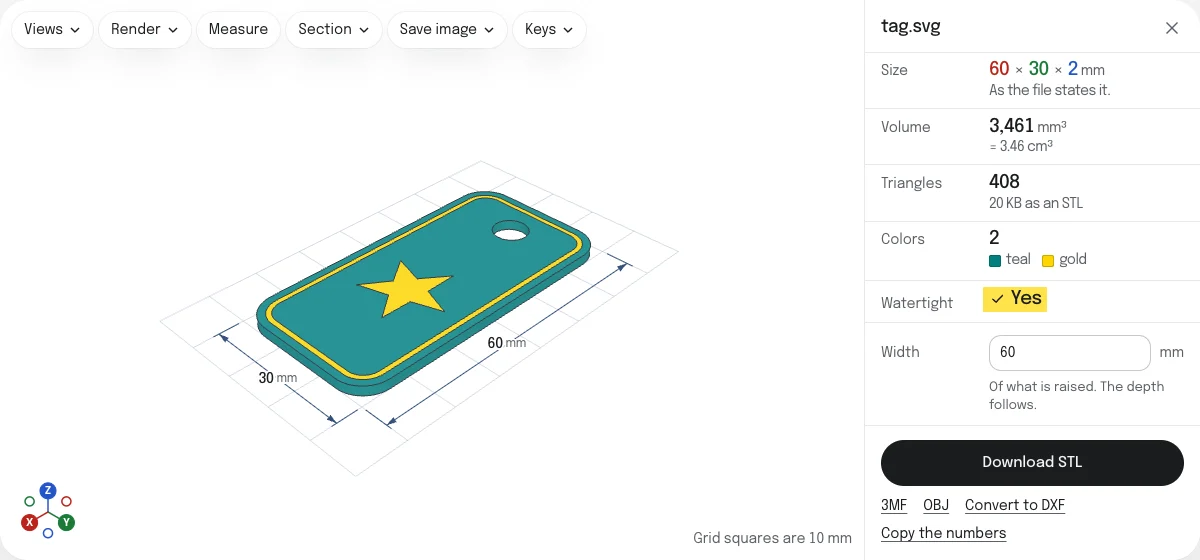
What is raised, and what is not
What a browser shows of your SVG is what is raised.
- Filled shapes are raised over their whole area.
- Lines are raised at their own width, with their corners and ends as drawn: pointed, round or cut flat. A shape with a fill and a line gets both.
- A shape painted over another covers it, as it does on screen. What lies under it is not raised a second time.
Some things in an SVG have no outline to raise, and the page tells you when your file has any of them:
- Text is left out. Turn it into paths first.
- Pictures placed in the SVG (PNG or JPG) are left out.
- Clipping paths and masks are not applied. A shape that is partly hidden in the SVG is raised whole.
- Dashed lines are raised as whole lines.
Shapes that are hidden in the SVG stay out. A shape filled with a gradient or a pattern is raised as one flat shape, and counts as black among the colors.
Size, height, base plate and bevel
The size comes from the SVG. A file that states it in millimeters, centimeters or inches is that size. Pixels are read at 96 to the inch, and a file with only a viewBox has its numbers read as pixels. The page says which of these your file was.
If that is not the size you want, type the width. It is the width of what is raised, not of the SVG’s page, and the depth follows.
- Height is how far the shapes are raised, from 0.1 to 500 mm. It starts at 2 mm.
- Base plate puts a rectangular plate under everything, as thick as you set, reaching past the shapes by the margin you set. It is what holds separate letters together.
- Bevel cuts the top edges off at 45°. It never goes below the ground beside an edge, so a bevel larger than the height ends at the foot of the shape.
Curves are cut into straight pieces that stay within 0.01 mm of the curve, finer than a printer resolves. The larger the drawing, the more pieces: a solid of more than 2 million triangles, an STL of over 100 MB, is not made, and the page says so before it starts.
Holes and fill rules
A hole is where the browser shows nothing of a shape. SVG has two rules for which parts of a shape’s overlapping outlines are its inside, nonzero and even-odd, and a shape can name either. Each shape is filled by the rule it names, so a letter O, a washer or a frame comes out with its hole, exactly as on screen.
A drawing can also fake a hole by painting a shape in the background’s color over another. Those two shapes are two colors here, and both are raised. Set the upper color’s height to 0 to make the hole real.
One height, or a height for each color
With one height the result is one solid, whatever colors the drawing has.
Tick A height for each color and every color gets a height of its own. A raised logo on a lower plate, a line that stands above its fill, a background left out at 0: each is a matter of typing a number beside a color.
Up to 32 colors are told apart. A drawing in more than that, such as a picture traced in a hundred shades, is raised as one piece at one height, and the page says so.
The three downloads hold the same shape in different ways:
| What it holds | |
|---|---|
| STL | One closed solid, with no colors. For one filament. |
| 3MF | A part for each color, and the base plate as one more, in millimeters, each with its color. |
| OBJ | An object for each color, with a material file for the colors. |
The parts stand side by side and do not overlap, so each can be printed in its own filament.
Questions
Is my file uploaded?
No. The SVG is read and the solid is made by your own browser. Nothing is sent to a server, so a logo you are not free to share stays on your device.
Why is my shape only a thin wall?
Because in the SVG it is a line around nothing. A shape with a line and no fill is raised as that line, at the line's width, which is all a browser shows of it. Drawings made for a laser cutter are of this kind: hairlines with nothing inside. Give the shapes a fill in your drawing program, save, and drop the file again: they come out solid.
The page tells you when a line is thinner than 0.4 mm at the size you set, which is less than a common nozzle prints.
What happens to text?
It is left out, and the page tells you how many texts were. The shapes of letters live in a font, not in the SVG. Turn text into paths before saving: in Inkscape, select it and choose Path, then Object to Path; in Illustrator, Type, then Create Outlines.
Can I print the colors with an AMS or another multi-color printer?
Yes, with a step in your slicer. Download the 3MF: it holds a part for each color of the drawing, and the base plate as one more. Bambu Studio 2.8 opens it as one object with those parts in place, every one on the first filament until you give it another. PrusaSlicer 2.9 opens the parts as separate objects, named after their colors, and sets each down on the bed. Neither takes the colors themselves from the file.
An STL cannot do this. It holds one solid and no colors.
How do I take the background away?
Tick A height for each color and set the background's height to 0. A color at 0 is left out, and what it covered stays empty. The same takes away a white shape that was painted over a dark one to look like a hole: at 0 it becomes a real hole.
Is the STL ready to slice?
It is checked before it is offered, the way the STL viewer checks any file: for open edges and for edges shared by more than two faces. Watertight is marked Yes only when the check finds none, in the solid and in each color's part. If it says No, the faulty edges are drawn in red on the model.
Can I go from SVG to DXF instead?
Yes. Convert to DXF, under the download, opens the same file in the SVG to DXF converter, which keeps the outlines for a laser cutter or a CNC machine instead of raising them.