How it works
The file is reduced as it opens, to the share of its triangles you set last: a quarter, to begin with. The model on show is the one that is saved.
- The corners are welded where they meet, as the STL viewer welds them to check a file.
- meshoptimizer’s simplifier takes edges away one at a time, each where it moves the surface least, until the model has the share of triangles you asked for, or until its own measure of how far the surface moved would pass the limit.
- Two triangles it folds back to back, on the same three corners, cancel out: a wall of no thickness is no part of a solid.
- The result is checked for holes, and its size, volume and triangles are measured on it.
Options
- Keep: the share of the file’s triangles to aim at, from 1 to 100%. It starts at 25%.
- Largest change: how far the surface may move, as a share of the model’s longest side, from 0.01 to 10%. It starts at 0.5%, which for a part 100 mm long is half a millimeter. The field says what it is in the model’s unit.
- Show the file beside it: the file as it came, to the left of the result, turning with it.
- Units. STL files have no unit. Choose the one the model was drawn in, and the sizes read right. The STL keeps the file’s unit; the 3MF is written in millimeters.
Every change reduces the file again, and the choices are remembered for the next file.
What to expect
- A scan, a sculpt or a mesh exported at a fine setting loses most of its triangles with little to see: a quarter, or a tenth, is often enough.
- A part with flat faces and sharp edges, from a CAD program, has few triangles to spare. The simplifier takes out what it can within the limit and stops; the page says where it stopped.
- A round hole keeps its sides as straight pieces. With fewer triangles it has fewer of them, and a limit set tight keeps more.
The two downloads
Download STL saves the reduced model as a binary STL, named after your file with “-reduced” added. 3MF saves the same mesh as one object in millimeters.
Limits
- Up to 10 million triangles. A larger binary file is refused from its header, before its triangles are read; a text file once it is read. Blender’s Decimate modifier and MeshLab reduce larger files.
- Colors are not kept. Some programs write a color for each triangle of a binary STL; the reduced file has none.
- Holes are not closed and broken files are not mended. STL repair does that, before or after.
Checked in PrusaSlicer
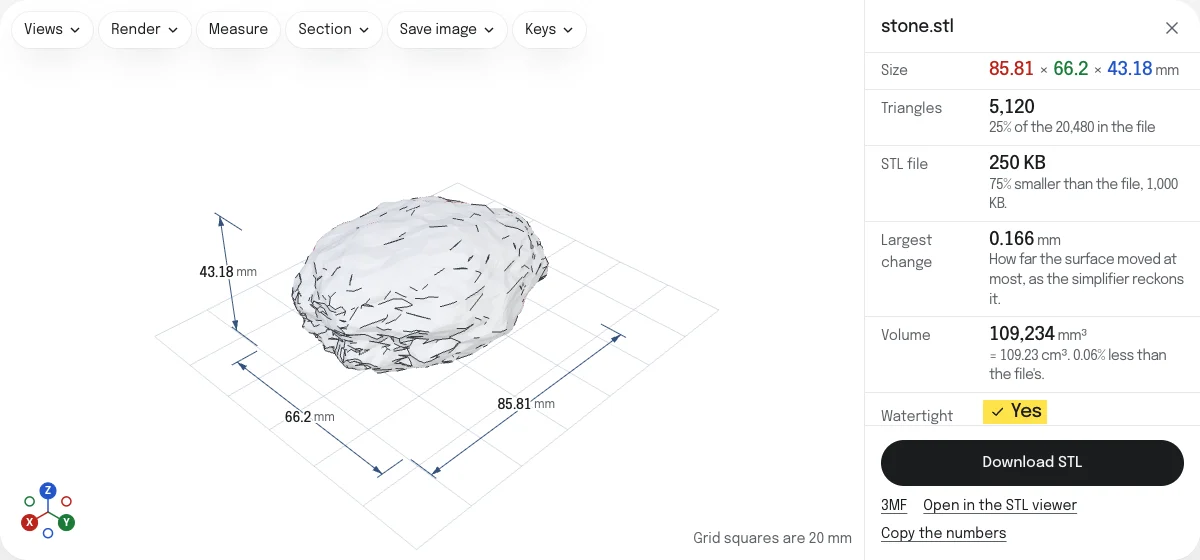
The sample stone reduced to a quarter of its triangles, opened in PrusaSlicer 2.9.6 on October 26, 2026: 85.814 × 66.201 × 43.175 mm, one part, manifold, with 5,120 facets and a volume of 109,234 mm³, 0.06% less than the stone as it came. How the tools are tested lists every tool’s file and what opened it.
Questions
Is my file uploaded?
No. The STL is read, simplified and written again by your own browser. Nothing is sent to a server, which for a file of hundreds of megabytes also means there is nothing to wait for but your own computer.
How much smaller does the file get?
An STL is 84 bytes and 50 for every triangle, whatever the triangles are. A quarter of the triangles is a quarter of the file. The page gives the size of the file you will download beside the size of yours.
An STL written as text is about five times the size of the same triangles written as binary. The page says so, and the file it saves is binary, so a text STL gets smaller even at 100%.
Will it change the shape?
A little, where it matters least. Triangles are taken out one edge at a time, each where taking it out moves the surface least, and the simplifier stops before its own measure of how far the surface moved passes the limit you set under Largest change. Flat faces lose their extra triangles first; fine detail goes last.
The page gives how far the surface moved at most, as the simplifier reckons it, and the volume against the file's. Tick Show the file beside it to look at the two together.
Why did it stop before the share I asked for?
Either taking out more would move the surface by more than the limit, or nothing more could be taken out without tearing the surface or turning faces over. The page says which, as near as it can tell. Raise Largest change to go further.
Is the result still printable?
The simplifier is made to keep a closed mesh closed and in one piece, and two triangles it folds back to back are taken out. Then the result is checked the way the STL viewer checks any file, and Watertight reads Yes only when that check finds no open edge and none shared by more than two faces. When the file was closed and the result is not, the page says so: reduce it less, or allow a smaller change.
Can I use this before converting to STEP?
Yes. The STL to STEP converter takes up to 25,000 faces after it merges the flat ones, and on a curved surface every triangle stays a face of its own, of about 2.5 KB in the STEP. A scan or a fine mesh brought down here first converts faster, and its STEP is smaller.