What a STEP file is
STEP is the format CAD programs use to hand models to each other. Its official name is ISO 10303, and the file is plain text that describes exact geometry: planes, cylinders, free-form surfaces and the solids they enclose. A round hole in a STEP file is a true circle, not a ring of flat pieces.
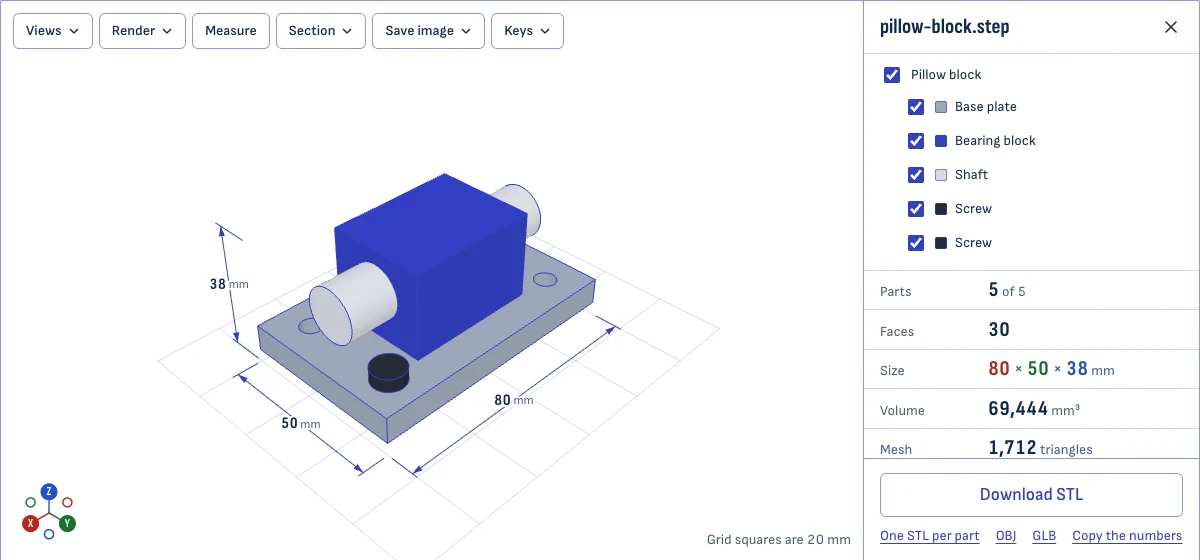
A STEP file can also hold a whole assembly: which parts there are, what they are called, what color they have and where each one sits.
The format comes in versions called application protocols. Three are in use:
- AP203 carries geometry and assembly structure.
- AP214 adds colors and layers. It came from the car industry and is the most common.
- AP242 merges the two and adds manufacturing information.
For looking at a part, measuring it or printing it, they behave the same.
STEP and STL
| STEP | STL | |
|---|---|---|
| Holds | Exact surfaces and solids | Triangles |
| Curves | True circles and curves | Flat pieces |
| Units | Stated in the file | None |
| Parts, names, colors | Yes | No |
| Opens in | CAD programs | Slicers and almost everything else |
A slicer needs triangles, so a STEP file is turned into a mesh at some point on the way to a printer. You can do that here and choose how fine the mesh is.
Opening STEP files without CAD
Neither Windows nor macOS can show a STEP file on its own. Double-clicking one either does nothing or offers to search for an app.
Drop the file on this page instead. It opens on Windows, macOS, Linux, ChromeOS, iPhone, iPad and Android. If you want a program on your computer, FreeCAD is free and opens STEP on all three desktop systems. A SolidWorks part someone sent you opens here once it is saved as STEP: how to open SolidWorks files.
What you can do with the model
- Explore the assembly. The parts are listed with their names and colors. Hide parts, or show only one.
- Pull it apart. The Explode slider moves every part away from the middle, so you can see what is inside.
- Cut it open. Section slices the model along X, Y or Z and hatches the cut face.
- Measure. The overall size is drawn on the model. Measure gives the distance between any two points and snaps to corners and edges. Switched to Faces, it gives the diameter and radius of a hole or a round face you click, as the file’s geometry has it, and for two faces the angle between them, the distance between two parallel faces, or between the axes of two parallel holes.
- Check the walls. Thickness colors the solids on show by how thick the wall is under each place of their surface, measured on the mesh drawn (hide any loose surface first): red where it is thinner than your process prints (0.8 mm for FDM, 0.5 mm for resin, or your own), with the thinnest place marked and measured.
- Save a mesh. STL for a slicer, as one file or one per part; 3MF, OBJ and GLB keep the part names and colors, and OBJ and GLB the colors of single faces too. STEP to 3MF, STEP to OBJ and STEP to GLB say what each keeps.
Mesh quality
Curved faces have to be cut into triangles to be drawn or saved as a mesh. Three settings decide how finely:
- Coarse makes small files and visibly angular curves: a circle gets about 21 sides, more on large ones.
- Normal suits most parts: a circle gets about 42 sides, more on large ones.
- Fine is for curves that have to look and fit right: a circle gets about 158 sides, and a Ø20 mm hole is off by less than a hundredth of a millimeter.
Flat faces are exact at every setting. A fourth setting, Custom, takes a tolerance in millimeters and an angle in degrees of your own; the STEP to STL converter page explains the two.
Questions
Is there a difference between .step and .stp?
No. They are two endings for the same format. Some programs write .stp because old systems allowed only three letters. Both open here, and so does a STEP compressed with gzip (.stpz or .stp.gz), which is unpacked on your device first.
Are the sizes exact?
Yes, for files up to 30 MB. The size and volume come from the model's own geometry, not from the triangles drawn on screen, so a 16 mm shaft reads 16 mm at any mesh quality.
Larger files are measured on the mesh, and the page says so. A mesh cuts a little off every curve, so round parts can then read a few hundredths of a millimeter small. Point-to-point measuring snaps to corners that lie on the real geometry in both cases.
A hole's diameter, measured between faces, is twice the radius the file states, for files up to 30 MB. Past that it is the circle through the corners of the hole's mesh, which lie on its surface, and the page says so.
Is my file uploaded?
No. The file is read by OpenCascade, an open-source CAD kernel, running inside your browser. Nothing is sent to a server, which matters for drawings you are not free to share.
Which STEP versions open?
AP203, AP214 and AP242: the three in everyday use. Geometry, assembly structure, part names and colors are read, and so is AP242 tessellated geometry. Manufacturing notes attached to an AP242 model, such as tolerances, are not shown. An assembly exported as one file per part opens one file at a time: export it as a single file to see it whole.
Can I edit the model?
No. This is a viewer. You can hide parts, pull the assembly apart, cut it open, measure it and save a mesh. To change the geometry you need a CAD program; FreeCAD is free and opens STEP.
How large a file can I open?
As large as your device's memory allows, and big assemblies take time to read: a 58 MB assembly of 2,600 parts took about a minute and a half on a laptop in testing. The page stays usable while it works and you can cancel.