What you get
A STEP file with a solid in it: something a CAD program treats as a part, not as a picture of one.
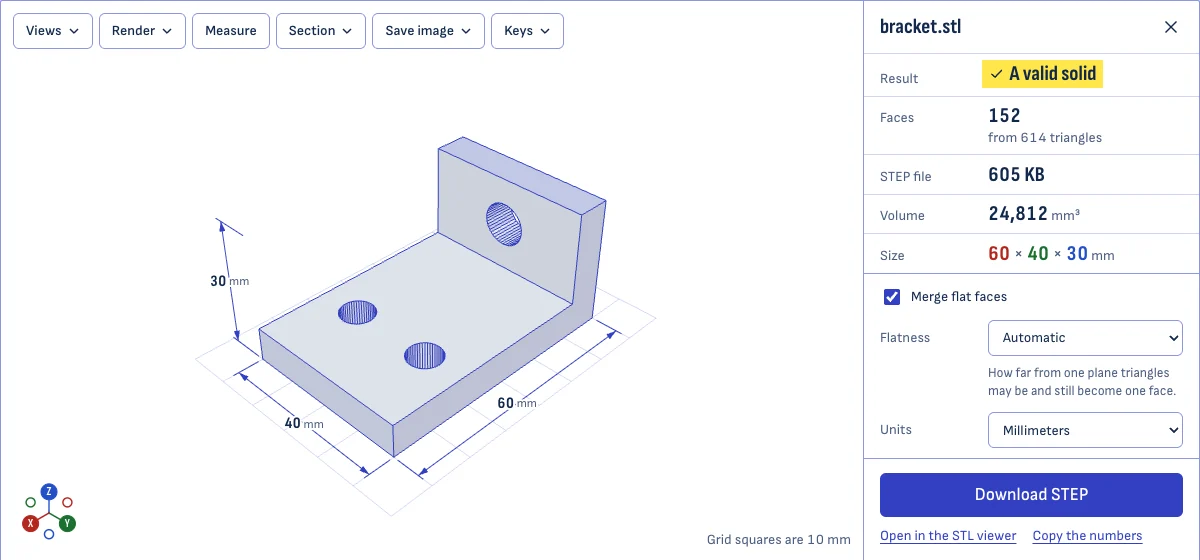
Every flat region of the mesh becomes a single flat face. A cube made of 12 triangles comes out as 6 faces, and a bracket with thousands of triangles on its flat sides comes out with one face per side. That is the difference between a file you can work on and one where every click selects a sliver.
The merging works on real-world meshes, not only tidy ones. An STL stores rounded numbers, so the triangles of one flat face are almost never exactly in one plane, least of all on a part that sits at an angle. The converter merges triangles that are flat to within about a thousandth of a millimeter and then puts their corners exactly on the plane.
What you don’t get
- True curves. Cylinders, fillets and spheres stay as the flat strips the mesh has. The solid is exact to the mesh, not to the design the mesh came from.
- A feature tree. There are no sketches, extrusions or dimensions to edit.
- A repaired mesh. A mesh with holes becomes a shell. The STL viewer shows where the holes are.
When it’s worth doing
- You need to add a hole, a slot or a chamfer to a part you only have as an STL.
- You want to place a downloaded part next to your own design to check the fit.
- A supplier or a colleague only accepts STEP.
- You want to measure the part with CAD tools.
For a part made of flat faces and a few holes, the result is good to work on. For an organic shape, a sculpt or a scan, expect a heavy file made of small faces; it will open, but it will be slow.
Options
- Merge flat faces. On by default. Switch it off to keep one face per triangle.
- Flatness. How far from a plane triangles may be and still count as one face. The automatic value suits clean meshes; raise it for a mesh with slightly uneven flat areas.
- Units. STEP files are in millimeters and STL files have no unit. If the STL was drawn in inches, say so, and the solid comes out the right size.
Other ways to do it
FreeCAD does the same conversion on your computer. In the Part workbench, choose “Shape From Mesh”, then “Convert to Solid”, then “Refine Shape” to merge the flat faces. Fusion and SolidWorks have their own mesh-to-solid commands.
This page is quicker when you have one file and no CAD program open, and it gives the same kind of result: the files it writes open in FreeCAD and pass its “Check Geometry” tool without errors.
Questions
Can I edit the STEP in SolidWorks, Fusion or Onshape?
Yes, as an imported solid. You can cut holes in it, add fillets and chamfers to its straight edges, combine it with other parts and put dimensions on it.
What you don't get is the history of how the part was designed. An STL never had one, so there are no sketches or features to change: you add to the solid, you don't re-drive it.
Why are curves still faceted?
An STL has no curves. A hole in an STL is a ring of flat strips, and nothing in the file says it was ever round. The converter keeps the shape exactly as the mesh has it, so a 48-sided hole stays 48-sided.
Flat areas are different: many triangles that lie in one plane really are one face, and they are merged into one.
What's the maximum size?
The limit is on faces after merging, not on triangles. A mechanical part with 100,000 triangles and mostly flat faces converts in seconds. A sculpted or scanned shape keeps a face for almost every triangle, and each face adds about 2.5 KB to the file: 10,000 faces make about 25 MB.
Above 25,000 faces the page offers to simplify the mesh first, and tells you how far the surface moves when it does. Meshes over 2 million triangles have to be simplified before anything else.
Is the result a solid?
If the mesh is closed, yes: the result is checked by the CAD kernel and the page marks it as a valid solid. The files this converter writes also pass the geometry check in FreeCAD.
If the mesh has holes, there is no inside to speak of. The page tells you so, shows the open edges in red and lets you convert to a shell, which is a set of faces without volume.
Which STEP version is written?
AP214, in millimeters, which every current CAD program reads. The file can end in .step or .stp; the content is the same.
Is my file uploaded?
No. The conversion uses OpenCascade, the geometry kernel behind FreeCAD, running inside your browser. It is a large download the first time, around 6 MB when compressed, and the browser keeps it afterwards.