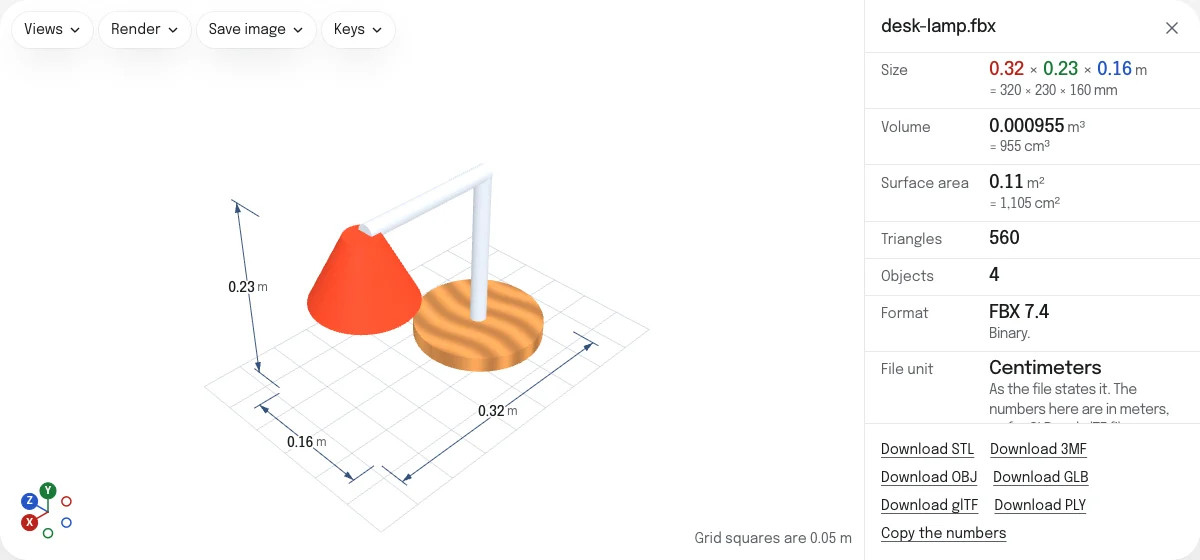
What the viewer shows
The model with its materials and textures, in the viewer’s own light, standing up when its file says Y or Z is up. Beside it are the numbers the STL viewer gives any mesh: its size, its volume and area, its triangles and objects, and whether it is closed, which a model to 3D print has to be.
Under them is what the file says of itself, and what it is made of:
- Format: the version of FBX, and whether it is binary or text.
- File unit: the unit the file states, which its numbers are read in.
- Up axis: the axis the file says is up.
- Bones, when the file has a skeleton.
- Draw calls, Materials and Textures, with what the textures take of the graphics card’s memory.
- Animations, when the file has them.
- Written by: the program that wrote the file, as the file says.
The sample is a desk lamp in centimeters, drawn standing on Z as 3ds Max draws: a base in a picture of wood that the file holds, two arms and a shade, with an animation that nods them.
Animations
A file with animations has Play beside its numbers, and a list to choose one when it has several. The animation plays over and over until you press Stop, which puts the model back as it is at rest. A character rigged with a skeleton moves with it, and a face with blend shapes changes as they do. The sizes, the volume and the check for holes are of the model at rest, as it opens, so the dimension lines are taken off while it moves. An animation made of several layers plays its first.
Textures, held and named
An FBX holds its pictures inside it, or names them and leaves them beside it. Pictures it holds are shown as it opens. For the others, drop the FBX together with its pictures: select them all, drop the folder they are in, or drop a ZIP of that folder. They are matched by file name, whatever folder the FBX says they were in.
The page lists every picture the file names that was not dropped, and draws those parts in their material’s color. PNG, JPEG, WebP, BMP and TGA pictures are shown; a PSD, or another format this browser does not show, is listed as such.
Size and which way up
An FBX states its unit and its up axis. Most files are in centimeters, which is FBX’s own unit, and a file that states none is read in centimeters. The viewer shows every model in meters, as it shows GLB and glTF files, so the two kinds can be opened side by side and measured alike; File unit gives the unit the file states. A file drawn standing on Z, as 3ds Max and some Blender exports are, is stood up the same way as one that stands on Y. A file that says X is up, or that up points down, is shown as it is drawn, and its Up axis row says it may lie on its side.
What is left out
The file’s lights and cameras are left out, of the view and of every file saved: every model here is lit and seen alike, so models from different files can be compared. NURBS surfaces and patches are not read, only meshes; a curve is drawn as a line, and is neither measured nor saved. Of a material with several layers of textures, the first is shown.
Saving it
On its own, an FBX saves as a GLB with its materials, textures, skeletons and animations, which a web page, a game engine or an AR viewer reads. It also saves as an OBJ with its meshes’ names and colors, and as an STL or a 3MF in millimeters to 3D print it, as it stands at rest.
Questions
Is my file uploaded?
No. The FBX is read by your own browser. The page asks the server for nothing that your file names: a texture the file names is looked for among the files you dropped with it, and only there.
Which FBX files open?
FBX 7, the version of FBX 2011 and every release since, binary or text. Blender, Maya, 3ds Max, Unity and Mixamo write it. An FBX 6 file, from 2010 or before, is not read: export it again from the program that made it, choosing FBX 2011 or later.
Why is the size in meters?
An FBX states its unit, centimeters in most files. The viewer reads that unit and shows the model in meters, as it shows GLB and glTF files, so files of both kinds can be opened side by side and measured alike. The unit the file states is under File unit. To save an STL, OBJ or PLY in another unit, choose it under "Unit of a saved STL, OBJ or PLY".
Why are some of the textures missing?
An FBX holds its pictures, or only names them. Pictures it holds are shown. Pictures it names are looked for among the files you dropped with it, by their file names: drop the FBX together with them, the folder they are in, or a ZIP of that folder. The page lists each picture the file names that was not dropped, and each one this browser cannot show, such as a PSD.
Which animations play?
Each animation the file holds, as three.js reads it: models and bones that move, turn and scale, skins, and blend shapes. One plays at a time, over and over, until you press Stop, which puts the model back at rest. The sizes and the check for holes are of the model at rest.
Can I save it as GLB?
Yes. On its own, an FBX is saved as a GLB or a glTF with its meshes, materials, textures, skeletons and animations, in meters with Y up as glTF asks. With other files on show, the GLB holds their meshes, names and colors only. The links under the numbers save STL, OBJ, 3MF and PLY too, of the model at rest.