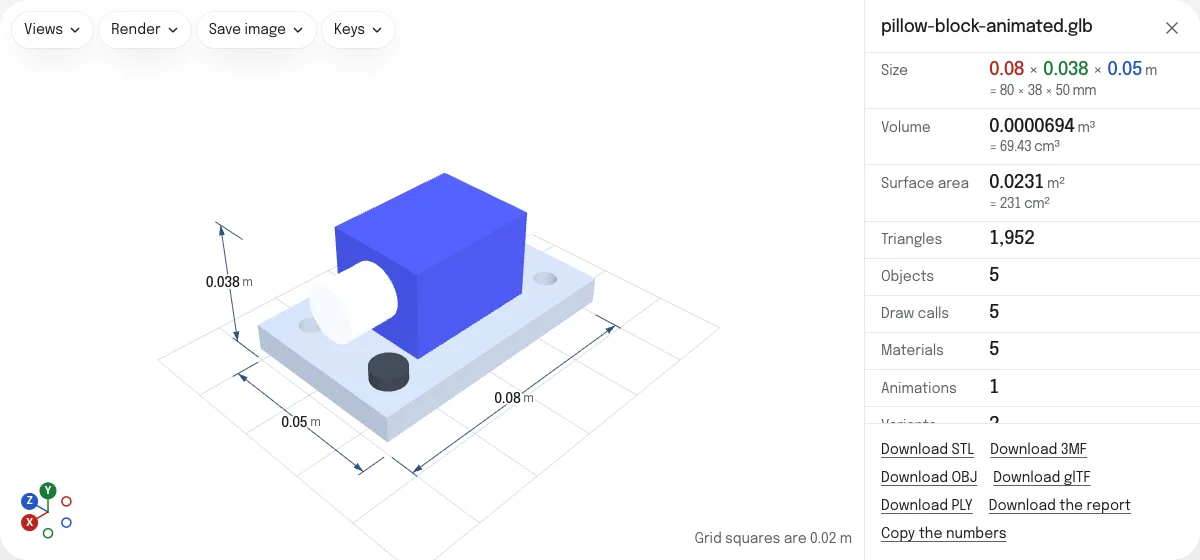
What the viewer shows
The model with its own materials and textures, lit softly from all round, as the program that made it meant it to look. Beside it are the numbers the STL viewer gives any mesh: its size, its volume and area, its triangles and objects, and whether it is closed, which a model to 3D print has to be. The sizes are in meters, the unit glTF is written in.
Under them is what the file is made of:
- Draw calls: one for each mesh drawn with its material, which is what the graphics card is asked to do for every frame.
- Materials and Textures, with what the textures take of the graphics card’s memory: four bytes a pixel, and a third more for the smaller copies drawn from far away.
- Animations and Variants, when the file has them.
- Extensions: the additions to glTF the file uses, by their names.
- Written by: the program that wrote the file, as the file says.
Animations
A file with animations has Play beside its numbers, and a list to choose one when it has several. The animation plays over and over until you press Stop, which puts the model back as it is at rest. The sizes, the volume and the check for holes are of the model at rest, so the dimension lines are taken off while it moves.
The sample is the pillow block of the STEP viewer with an animation that takes it apart: the screws rise, the shaft slides out and the block lifts, then all of it goes back together.
Material variants
A glTF can hold several sets of materials for one model, with the extension KHR_materials_variants: a product in its colors, a part in steel or painted. The viewer lists them under Variant. Choose one and the model takes its materials; “As the file opens” takes it back.
An STL, OBJ, 3MF or PLY saved from here is given the colors of the variant on show. A GLB saved as a glTF, and a glTF as a GLB, keep every variant, since the file is repacked as it is.
Checked against the glTF specification
As it opens, the file is checked by the Khronos glTF Validator, the one the makers of glTF publish, running in your browser. Valid says what it found: yes when there is no error, with the warnings and notes it has beside it, or no with the number of errors and the first five of them.
Download the report saves the validator’s own report as a JSON file, with every message, its code and the place in the file it is about. It is the same report the validator gives from its command line, so it can be sent to whoever made the file.
A .gltf names its .bin and its pictures. The validator is given the ones you dropped with it, and reports any it names that are not there, as it does any other fault of the file. A file of more than 64 MB, with what was dropped beside it, is not checked: the validator builds a model of its own beside the one on show, and the device’s memory is left to the view.
How to open a glTF with its files
A GLB is one file. A .gltf is the JSON of the model, and it names a .bin with the geometry and a picture for each texture. Drop them together: select them all, drop the folder they are in, or drop a ZIP of that folder. The names are matched by the file’s name, whatever folder the .gltf says it is in.
What does not open yet
Meshes compressed with Draco and textures stored as KTX2 are not read here yet, and the page says so when a file uses them. Meshes compressed with meshopt open. To convert a model the viewer opens, see GLB to STL and GLB to OBJ.
Questions
Is my file uploaded?
No. The file is read by your own browser, and so is the check against the specification: the validator runs on your device. The page asks the server for nothing that your file names. A picture or a .bin that a .gltf names is looked for among the files you dropped with it, and only there.
Why is the size in meters?
glTF is in meters by its specification, and its Y axis points up. The viewer measures it in meters for that reason, and stands it on the grid with Y up. To save an STL, OBJ or PLY in another unit, choose it under "Unit of a saved STL, OBJ or PLY".
What is a draw call?
One request to the graphics card to draw one mesh with one material. A model of many small meshes takes many of them, and a phone or a game engine draws it more slowly than one of the same triangles in a few meshes. A mesh drawn many times over by instancing is one draw call.
My file opens everywhere. Why does it say it is not valid?
Viewers are forgiving: three.js, and so this page, draws many files that break a rule of the specification. The Khronos glTF Validator does not forgive. An error there is something another program may read differently or refuse, such as an accessor whose bounds are wrong or a buffer that is shorter than the file says. Download the report to see each one, with the place in the file it is about.
Which animations play?
Those three.js reads from glTF: moves, turns and scales of nodes, skins and morph targets. One plays at a time, over and over, until you press Stop. Stop puts the model back as it is at rest, which is what the sizes and the check for holes are of.
Can I save it as STL, OBJ or 3MF?
Yes. The links under the numbers save what is on show as an STL, an OBJ, a 3MF or a PLY, in the colors of the variant on show, and as a glTF with its .bin beside it. Animations and textures are not carried into those formats. A GLB or a glTF on its own is saved as the other with everything in it.
Why does my Draco file not open?
Draco-compressed meshes and KTX2 textures are not read here yet. Export the file again with Draco compression switched off and with PNG or JPEG textures, and it opens. Files compressed with meshopt open.