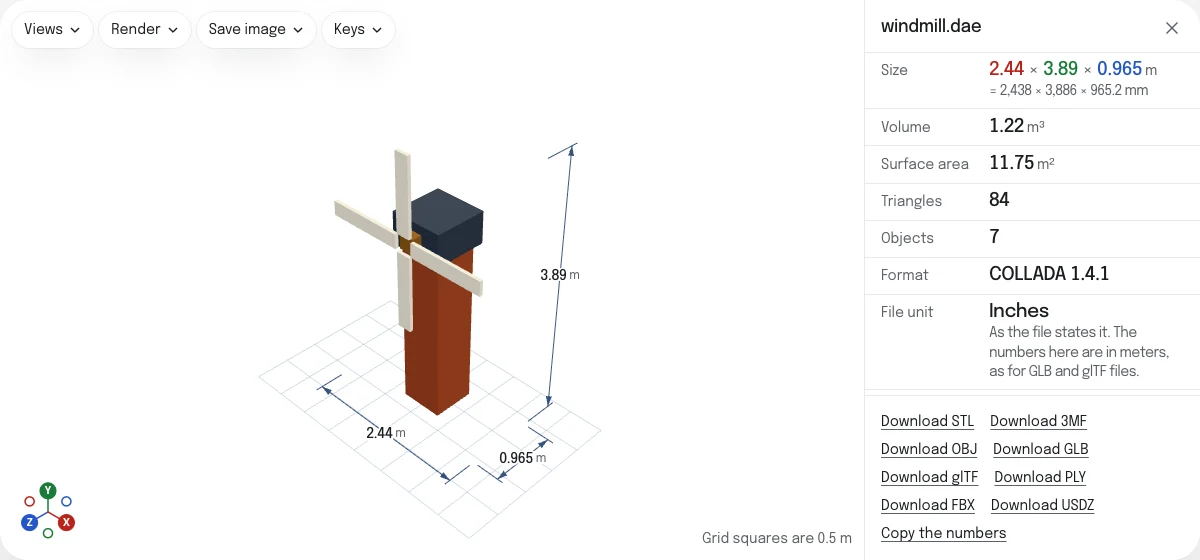
What the viewer shows
The model with its materials and textures, in the viewer’s own light, standing up whichever axis its file says is up. Beside it are the numbers the STL viewer gives any mesh: its size, its volume and area, its triangles and objects, and whether it is closed, which a model to 3D print has to be.
Under them is what the file says of itself, and what it is made of:
- Format: the version of COLLADA.
- File unit: the unit the file states, which its numbers are read in.
- Up axis: the axis the file says is up.
- Pictures named: the picture files it names, by their names.
- Bones, when the file has a skeleton.
- Draw calls, Materials and Textures, with what the textures take of the graphics card’s memory.
- Animations, when the file has them.
- Written by: the program that wrote the file, as the file says.
The sample is a windmill in inches, drawn standing on Z as SketchUp draws: a brick tower under a cap, and four sails on a wooden hub, one mesh placed four times, which turn once every four seconds when you press Play.
Textures
A DAE names its pictures and almost never holds them. Drop the DAE together with its pictures: select them all, drop the folder they are in, or drop a ZIP of that folder. They are matched by file name, whatever folder the DAE says they were in, so a path from the computer that made it, such as C:\Users\...\textures\brick.jpg, still finds brick.jpg.
The page lists every picture its materials use that was not dropped, and draws those parts in their material’s color. PNG, JPEG, WebP, BMP and TGA pictures are shown; one this browser cannot show is listed as such. A picture held inside the file as bytes, which COLLADA allows and few programs write, is not read, and the page says so.
Size and which way up
A DAE states its unit and its up axis. SketchUp writes inches and Z up, Blender (up to version 4, the last that wrote COLLADA) meters and Z up, and a file that states neither is read in meters with Y up, as COLLADA says. The viewer shows every model in meters, standing on Y, as it shows GLB and glTF files, so models of each kind can be opened side by side and measured alike. File unit and Up axis give what the file states.
What is left out
The file’s lights and cameras are left out, of the view and of every file saved: every model here is lit and seen alike, so models from different files can be compared. COLLADA’s physics and its kinematics, which describe how a robot’s joints may move, are not read. A curve or a line is drawn, and is neither measured nor saved.
Saving it
On its own, a DAE saves as a GLB with its materials, textures and animations, which a web page, a game engine or an AR viewer reads. It also saves as an OBJ with its meshes’ names and colors, as an FBX for a game engine, as a USDZ for AR on an iPhone, and as an STL or a 3MF in millimeters to 3D print it, as it stands at rest.
Questions
Is my file uploaded?
No. The DAE is read by your own browser. The page asks the server for nothing that your file names: a texture the file names is looked for among the files you dropped with it, and only there.
What is a DAE file?
A COLLADA file: a 3D scene written as XML, with its meshes, materials, the pictures they are painted with, and animations. SketchUp exports it, and so do 3ds Max, Maya, Cinema 4D and many older games' tools. COLLADA 1.4 and 1.5 open here.
Why are the textures missing?
A DAE names its pictures and keeps them beside it, often in a folder of their own. Drop the DAE together with them, the folder they are in, or a ZIP of that folder: they are matched by file name, whatever folder the DAE says they were in. The page lists each picture its materials use that was not dropped, and draws those parts in their material's color.
Why is the size in meters?
A DAE states its unit, often inches from SketchUp and meters from Blender. The viewer reads that unit and shows the model in meters, as it shows GLB, glTF and FBX files, so files of each kind can be opened side by side and measured alike. The unit the file states is under File unit.
Which animations play?
Each animation the file holds, as three.js reads it: parts that move, turn and scale, and skins bent by their bones. One plays at a time, over and over, until you press Stop, which puts the model back at rest. The sizes and the check for holes are of the model at rest.
Can I save it as GLB?
Yes. On its own, a DAE is saved as a GLB or a glTF with its meshes, materials, textures and animations, in meters with Y up as glTF asks. With other files on show, the GLB holds their meshes, names and colors only. The links under the numbers save OBJ, STL, 3MF, PLY, FBX and USDZ too, of the model at rest.