What an OBJ file is
An OBJ is a mesh written as text: a line for each corner (v), each point of a picture (vt) and each face (f), in objects and groups (o, g). Its colors are not in it. It names a material file, the MTL (mtllib), and says which material each face has (usemtl). The MTL gives each material its color (Kd) and the picture laid over it (map_Kd).
So one model is often three kinds of file: the OBJ, the MTL, and a picture for each texture. All of them have to be opened together.
How to open an OBJ with its textures
Drop the OBJ with its MTL and its pictures in one go: select them all, drop the folder they are in, or drop a ZIP of it. The MTL is the one the OBJ names, found by its file name, and each picture the one the MTL names. A folder written in front of a name in either file is passed over, since the files are the ones beside the OBJ.
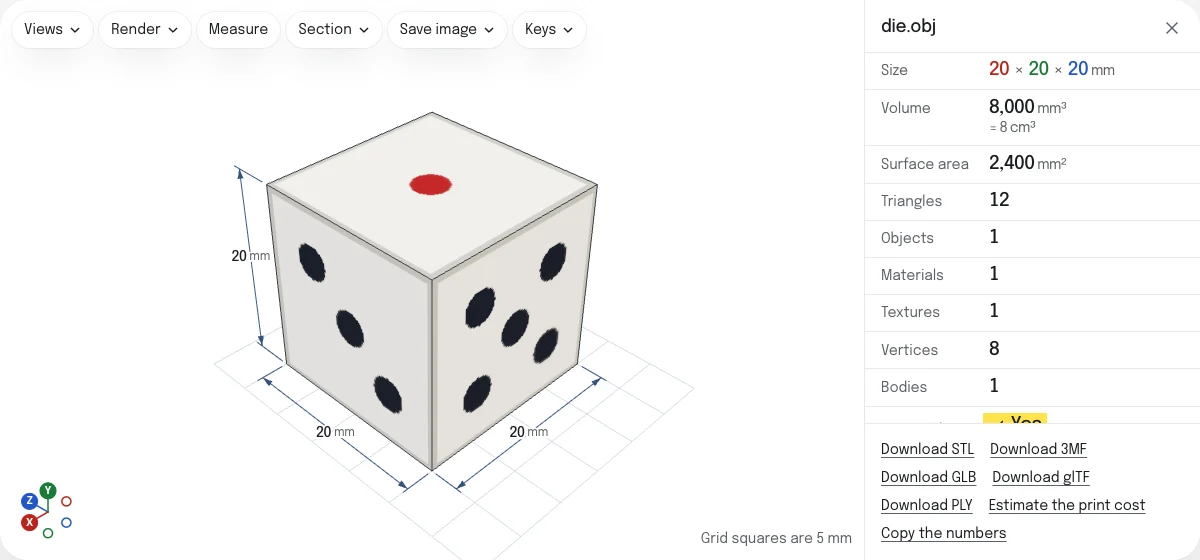
The rows say what was found: Objects, the objects and groups the OBJ names; Materials, the materials it uses; Textures, how many pictures are shown of those its materials name. A picture that is named and was not dropped is named under the numbers, with what to do.
What the viewer shows
The model with each material’s picture laid over it, tinted by the material’s color as the format has it, or in the color alone where there is no picture. Beside it, the numbers of the STL viewer: size, volume, surface area, triangles, and whether the mesh is closed, which a model to 3D print has to be. Open edges are drawn in red.
Of what an MTL can hold, the color and its picture are shown. Other pictures (map_Bump, map_Ks, norm) and transparency (d) are not.
Measure and check before printing
Measure gives the distance between two points you pick on the model, snapping to corners and edges; Section cuts it open. An OBJ stores no unit, so choose the one it was made in under Units. A model for a slicer is saved as an STL or a 3MF in millimeters, standing on Z, as slicers take it; for the web or a game engine, as a GLB.
The sample is a die of 20 mm: one object, one material and one picture with its six faces, in a ZIP.
Questions
Is my file uploaded?
No. The OBJ, its MTL and its pictures are read by your own browser. The page asks the server for nothing the files name: a picture the MTL names is looked for among the files you dropped, and only there.
Why is my OBJ gray?
Its colors and textures are in the material file it names, the MTL, and the MTL was not dropped with it. Drop the OBJ and the MTL together, with the pictures, or drop the folder they are in. The page says which file the OBJ asks for.
Why is a texture missing?
The MTL names a picture that was not dropped, or one this browser cannot show. PNG, JPG, WebP and BMP are shown; TGA and DDS are not. The page names each picture it did not find. Save the picture as a PNG, change its name in the MTL, and drop the files again.
What unit is my OBJ in?
An OBJ stores no unit. The viewer starts in millimeters, and you choose the unit the model was made in under Units: every number follows. A model under 10 units across was probably made in inches, and the viewer asks.
Why is my model lying on its side?
Most programs write an OBJ with Y up, and the viewer stands it so. A file written with Z up then lies on its back: choose Z under "Up axis" in the Views menu, and the choice is remembered for OBJ files.
Can I convert it?
Yes. The links under the numbers save what is on show as an STL, a 3MF, a GLB, a glTF or a PLY, with the colors of its materials. Textures are not carried into those files. Each has a page of its own that says what it keeps, such as OBJ to STL and OBJ to GLB.