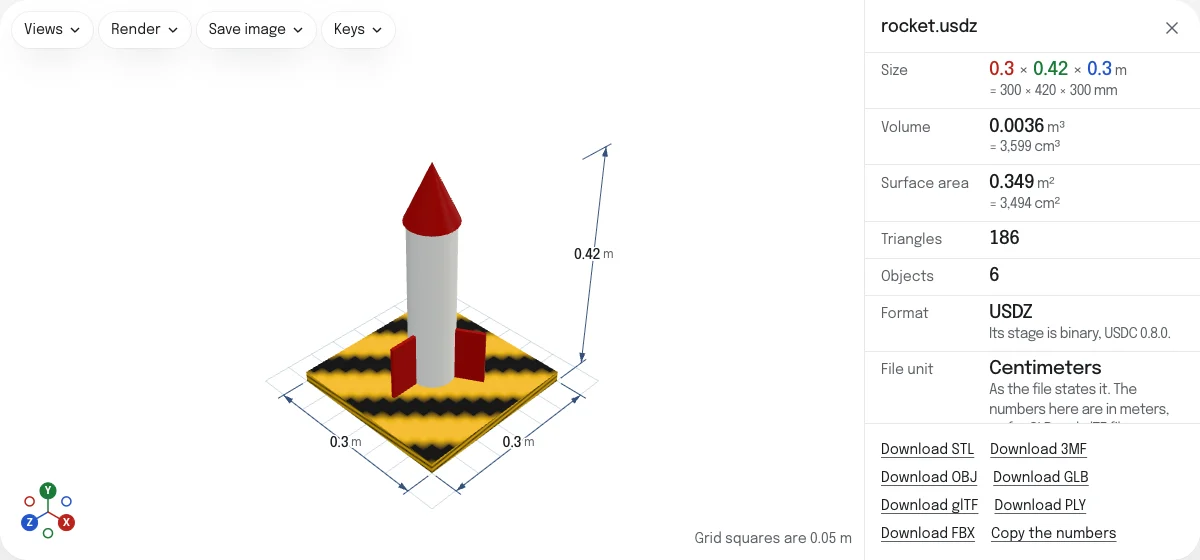
What the viewer shows
The model with its materials and textures, in the viewer’s own light, standing up whichever way its file says is up. Beside it are the numbers the STL viewer gives any mesh: its size, its volume and area, its triangles and objects, and whether it is closed, which a model to 3D print has to be.
Under them is what the file says of itself, and what it is made of:
- Format: whether its scene is binary (USDC, with the version of the format) or text (USDA).
- File unit: the unit the file states, which its numbers are read in.
- Up axis: Y or Z, as the file states it.
- Pictures: the pictures packed in it, by their names.
- Bones, when the file has a skeleton.
- Draw calls, Materials and Textures, with what the textures take of the graphics card’s memory.
- Animations, when the file has them.
- Written by: the program that wrote the file, as the file says.
The sample is a toy rocket on its launch pad, drawn in centimeters, its pad painted in a picture of yellow and black stripes. The rocket turns once every four seconds when you press Play.
Without an iPhone
A USDZ opens in Quick Look on an iPhone, an iPad or a Mac, and almost nowhere else. This page opens it in any recent browser, on Windows, Linux, Android or ChromeOS, and gives what Quick Look does not: its size, its triangles and materials, and the files to take it further, a GLB for the web or a game engine, an OBJ, or an STL to 3D print it.
What is read, and what is not
The scene is read by three.js’s USD reader, with two things put right that it read wrong. A binary scene holds a short vector of small whole numbers, such as a move of (0, 2, 0), packed into a few bytes, and three.js read such a vector as a single number: Blender writes a move of whole units that way. And three.js read none of a binary scene’s notes on itself, where the program that wrote it gives its name.
A file’s lights and cameras are left out, of the view and of every file saved: every model here is lit and seen alike. Layers a USDZ holds are followed; a layer or a picture it names and does not hold is not looked for anywhere else. A USD scene that is not packed as a USDZ (.usd, .usda or .usdc on its own) does not open here: it names its pictures and other layers beside it.
Saving it
On its own, a USDZ saves as a GLB with its materials, textures and animation, which a web page, a game engine or Android’s AR viewer reads. It also saves as an OBJ with its meshes’ names and colors, as an FBX, and as an STL or a 3MF in millimeters to 3D print it, as it stands at rest.
Questions
Is my file uploaded?
No. The USDZ is unpacked and read by your own browser. The page asks the server for nothing that your file names: a picture the file names and does not hold is listed, not looked for.
What is a USDZ file?
A ZIP of a USD scene and the pictures it is painted with, the format Apple chose for AR Quick Look on iPhones and iPads. Reality Composer, Reality Converter, Blender, Maya and Houdini write it. The scene inside is binary (USDC), as most are, or text (USDA): both open here.
Why is the size in meters?
A USDZ states its unit, often centimeters, and a file that states none is read in centimeters, as USD reads it. The viewer shows every model in meters, standing on Y, as it shows GLB, glTF and FBX files, so files of each kind can be opened side by side and measured alike. The unit the file states is under File unit.
Which animations play?
The motion of its parts, as three.js reads it, and skins bent by their bones. Press Play to see it; Stop puts the model back at rest, where its sizes and the check for holes are measured.
Can I save it as GLB?
Yes, on the [USDZ to GLB](/usdz-to-glb/) page or with the link under the numbers: its meshes, materials, pictures and animation, in meters with Y up as glTF asks. The links also save OBJ, STL, 3MF, glTF, PLY and FBX, of the model at rest.
Why are some textures missing?
A USDZ holds its pictures. PNG, JPEG, WebP and AVIF pictures are drawn; a picture in another kind, such as OpenEXR, is named and left off, and so is one the file names and does not hold. Those parts are drawn without it, in the color the file gives them, or white.