What the OBJ keeps, and what it loses
| In the OBJ | |
|---|---|
| Meshes | Each an object of its own name, where the USDZ places it |
| Normals | The USDZ's, or each triangle's own where it gives none |
| Colors | Each material's color, in the MTL beside the OBJ |
| Size and way up | Millimeters, or the unit you choose, with Y up |
| Textures | Not kept |
| Animation, skins | Not kept: the model at rest |
| Lights, cameras | Left out |
How to convert a USDZ to OBJ
- Drop the USDZ on this page. It is read in your browser; nothing is uploaded.
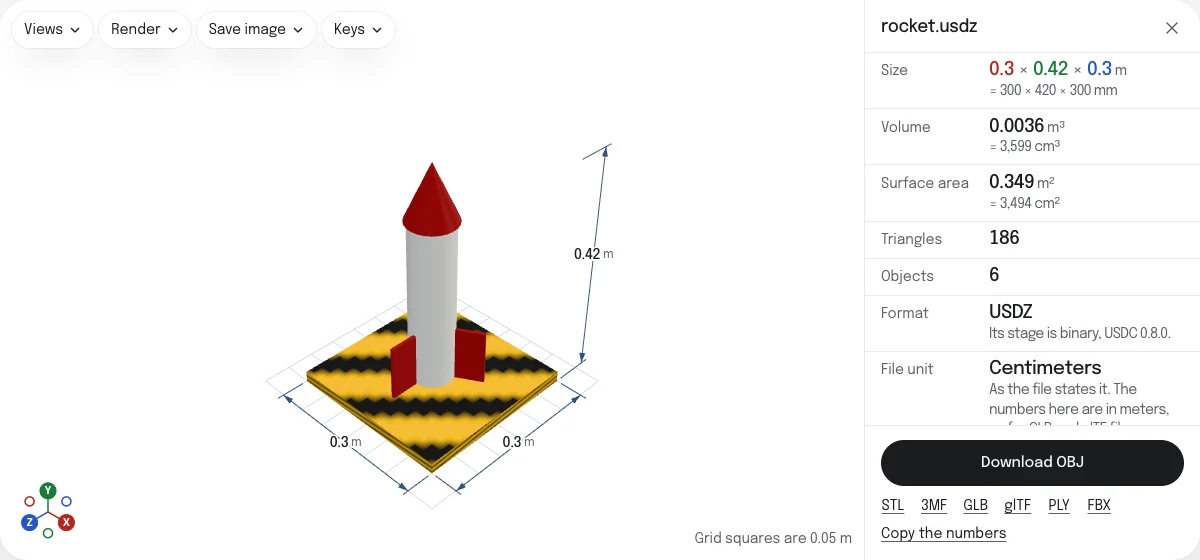
- Look at the model and its numbers: its size, its triangles, what its file says of itself.
- Choose Download OBJ. The OBJ and its MTL come in a ZIP named after the USDZ:
rocket.usdzbecomesrocket_obj.zip.
Binary and text
Most USDZ files hold their scene in USD’s binary form, USDC; some hold it as text, USDA. Both are read, by three.js’s USD reader with two things put right: a short vector of small whole numbers that a binary scene packs into a few bytes, such as a move of (0, 2, 0), which three.js read as a single number (Blender writes a move of whole units that way), and the notes a binary scene keeps on itself, which three.js did not read.
Checked in assimp
The OBJ of the sample rocket, read by assimp 6.0, an open-source library for reading 3D files, on November 13, 2026: six objects named Pad, Body, Fin_1, Fin_2, Fin_3 and Nose, each with its color in the material file, 186 faces, and 300 × 420 × 300 mm, standing on Y. The USDZ is in centimeters: its 42 cm arrive as 420 mm. How the tools are tested lists every converter’s file and what opened it.
Questions
Is my file uploaded?
No. The USDZ is read and the OBJ is written by your own browser. Nothing is sent to a server.
What does the OBJ keep?
Every mesh, as an object named after it, its normals, and the color of its material in the MTL beside it, in a ZIP. A mesh of several materials is an object for each. The pictures the USDZ is painted with are not kept: save a [GLB](/usdz-to-glb/) for them.
What unit is the OBJ in?
Millimeters, with Y up as the USDZ has it: the sample rocket, 42 cm tall, is 420 units tall in the OBJ. An OBJ states no unit, and most programs read it in millimeters or meters: choose another under Units before you save if yours expects one.
Is the animation kept?
No: an OBJ holds one shape. The model is saved as it stands at rest. A [GLB](/usdz-to-glb/) keeps the animation.