Which files open
| What is read | |
|---|---|
| LAS | Versions 1.0 to 1.4, point formats 0 to 10: positions, colors, intensity and class |
| LAZ | Not yet: the page says how to decompress it to LAS |
| PLY | ASCII and binary, with the colors of its vertices |
| PCD | Text, binary and compressed: x, y, z, rgb or rgba, intensity, label |
| XYZ, PTS | A point to a line: x, y, z, then colors or an intensity, parted by spaces, tabs, commas or semicolons |
An XYZ file does not say which column is which, so the viewer works it out from its first thousand lines: three whole numbers from 0 to 255 after x, y and z are colors, and a fourth column on its own is an intensity. A PTS file is read the same way, past the count on its first line. Points given as “nan”, as a scanner writes them where it saw nothing, are left out and counted.
Coloring the points
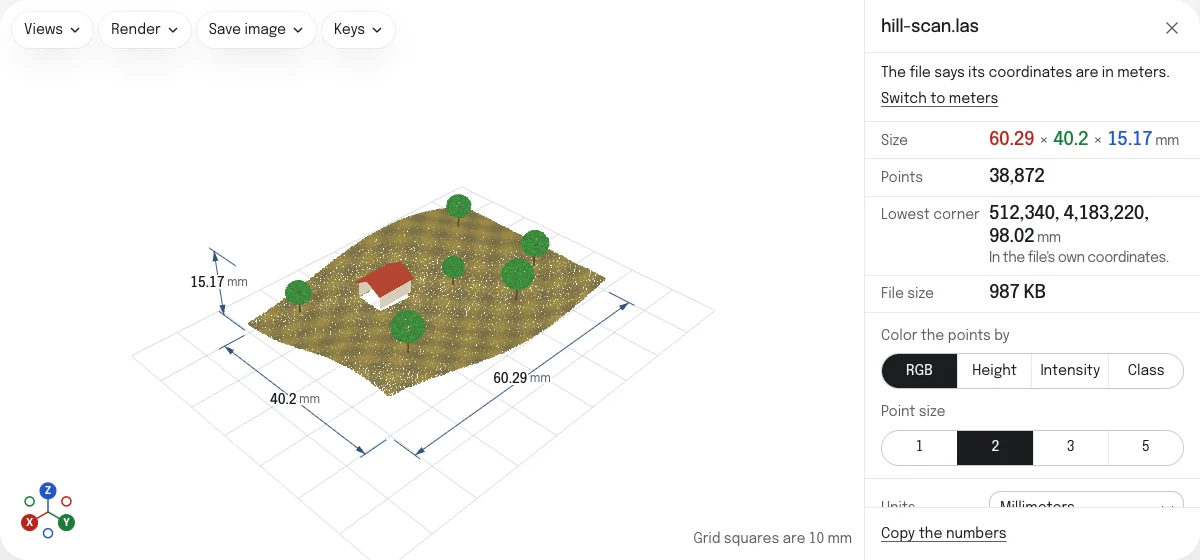
Under Color the points by:
- RGB: the colors the file gives its points, when it has them.
- Height: a ramp from the lowest point to the highest, along the axis that is up.
- Intensity: how strongly each point sent the scanner’s light back. The ramp runs between the values most points have, so that a few very bright returns, from a sign or a window, do not leave the rest dark.
- Class: what a LAS says each point is, ground, vegetation, building or water, in the colors of a list that gives each class and its count.
Point size draws each point 1, 2, 3 or 5 pixels across. Both choices are remembered.
Scans on a map
An airborne or survey scan gives its points on a map: in meters east and north of a distant origin, often millions of meters out. The viewer keeps each point to the millimeter there, and gives the scan’s lowest corner in the file’s own coordinates. Several tiles of one survey dropped together sit side by side, each where it is on the map.
The sample is a scan of a hillside of 60 by 40 meters with a house and six trees, written as a LAS with colors, intensities and classes, on a map in meters.
What it does not do
Measure and Section work on the faces of a mesh, and points have none, so they are not offered for a scan. A scan saves as a picture of the view, with the toolbar’s image button. To clean, mesh or crop a scan, use a program made for it, such as CloudCompare.
Questions
Is my file uploaded?
No. The scan is read by your own browser, on your device. That is also why a large file opens without a wait in a queue: it is never sent anywhere.
How many points can it open?
As many as your device's memory holds. Up to 10 million points are drawn; a scan with more is drawn thinned evenly, one point in every few, and the page says how many. The count, the size and the classes are those of every point in the file.
Why is my LAZ file refused?
A LAZ is a LAS compressed with LASzip, which this viewer does not read yet. Decompress it to LAS with laszip from LAStools, with PDAL or with CloudCompare, then drop the LAS here.
My scan has no colors. How is it drawn?
By height, from its lowest point to its highest, until you choose another way under "Color the points by". A scan with intensities or classes can be colored by those too.
What do the colors of the classes mean?
They are the classes of the LAS specification: brown for the ground, three greens for low, medium and high vegetation, orange for buildings, blue for water, and others for roads, wires and noise. Each class in the file is listed with its color and how many points it has.
What unit is my scan in?
A LAS names the unit of its map, most often meters or US survey feet, and the viewer offers to switch to it. PLY, PCD and XYZ files store no unit, so choose the one they were made in under Units.
Can I turn the scan into an STL?
Not here. Points have no surface between them, and an STL is a surface. Turning a scan into a mesh is a job for a program such as CloudCompare or MeshLab. A PLY that is a mesh, with faces, opens as one, and PLY to STL saves it.