What the FBX keeps, and what it loses
| In the FBX | |
|---|---|
| Shape | Every triangle, with its corners shared. Faces with more corners are cut into triangles |
| Colors | A material for each color of the material file, up to 32 |
| Shading | The OBJ's normals, when every corner has one |
| Size | Centimeters, from the unit you choose for the OBJ |
| Which way up | Y up, as the model stands on screen |
| Object and group names | Lost: a model for each color instead |
| Textures, colors of vertices | Lost |
| Limit | 5 million triangles, all the files on show together |
How to convert an OBJ to FBX
- Drop the OBJ on this page with its material file, or a ZIP of its folder, or choose them with the button. They are read in your browser; nothing is uploaded.
- Look at the model in its colors. If it lies on its back, choose Z points up in the Views menu.
- Under Units, choose the unit the model was drawn in.
- Choose Download FBX. The file is named after the OBJ:
lamp.objbecomeslamp.fbx.
Colors and materials
An OBJ keeps its colors in a material file that it names on a mtllib line, a diffuse color (Kd) for each material. The FBX is given a material for each color the faces use, each a Phong material of that color, matte and with no metal, which is what a diffuse color describes, and the faces of each color go in a model of their own. A material is written once, however many models have it. The pictures a material file names, and the colors an OBJ gives its vertices, are not written.
Size and orientation
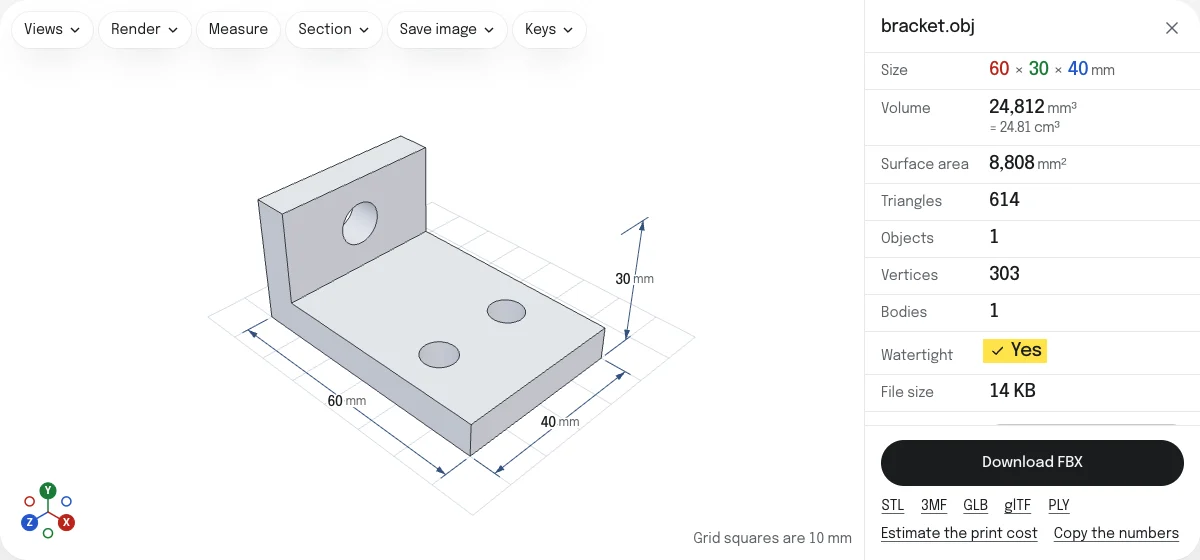
FBX states its unit, and the programs that read it scale the model from there. An OBJ states none. The converter takes the unit you choose under Units and the way up you see in the viewer, and writes the FBX in centimeters with Y up: the sample bracket, 60 mm long, is 6 units long in the file and 60 mm in Blender.
Checked in Blender, Godot and the FBX SDK
The FBX of the sample bracket was opened in Blender 5.2.3, in Godot 4.7.2 and in Autodesk’s FBX SDK 2020.3.7, on November 6, 2026. All three read one model of 614 triangles, named bracket, 60 × 30 × 40 mm with Y up, as the OBJ has it. An OBJ of two cubes in two colors of its material file comes in as two models, each with a material of its color, in Blender and in the FBX SDK. assimp 6.0 reads the same mesh and faces.
Godot reads each material’s color and nothing of its shine: every material comes in as fully rough. The site’s own FBX viewer draws the colors a little darker than Blender does: FBX does not say whether its colors are in linear light, Blender and Godot read them so, and three.js, which the viewer uses, does not.
How the tools are tested lists every converter’s file and what opened it.
Questions
Is my file uploaded?
No. The OBJ and its material file are read and the FBX is written by your own browser. Nothing is sent to a server.
Are the colors kept?
Yes, when the material file is dropped with the OBJ. Each color becomes a material of the FBX, matte and free of metal, and the faces of each color a model of their own, up to 32 colors. An OBJ colored vertex by vertex, as a scan is, has no place for its colors in the FBX: save a GLB or a PLY to keep them.
Are the textures kept?
No. The FBX has each material's own color, and not the pictures the material file names. To keep a model with its textures, save it from the program that made it.
What unit is the FBX in?
Centimeters, stated in the file, from the unit you choose for the OBJ under Units. An OBJ states no unit: millimeters is what the viewer opens one in. A model drawn in meters, as Blender writes an OBJ, needs Meters chosen first.
Which way up is the FBX?
Y up, as an OBJ is read by most programs, and as the FBX format itself is. If the model lies on its back, choose Z points up in the Views menu first: the FBX follows what you see.
Are the object names kept?
No. Each color becomes a model of its own, named after the file with a number for each color, and the names of the OBJ's objects and groups are not kept. An OBJ of one color is one model, named after its file.