How it works
The file is compressed as it opens, with the options you chose last, and the result is read back and checked before it is offered.
- glTF-Transform reads the file. A material, a mesh or a picture that repeats another, name and all, is kept once, what no scene uses goes, an animation’s keyframes that change next to nothing go, and vertices that are the same to the bit are one.
- Each picture larger than Largest side is brought down to it, and each is written again as WebP or JPEG if you chose one. A picture that would come out no smaller as WebP or JPEG, at its own size, is kept as it was, and the page says so.
- With Pack the geometry with meshopt ticked, positions, normals and a mesh’s texture coordinates, when all of them lie within the picture, are rounded to fine grids, as are vertex colors, skin weights and animations, and all of it is packed.
- The GLB is checked by the Khronos glTF Validator, and read back by the GLB viewer’s loader to be shown. A WebP picture is written without the color profile the browser puts in it: a glTF’s pictures are sRGB, and the validator warns of one.
Options
- Pack the geometry with meshopt: on to begin with. Untick it for a program that does not read meshopt; a file that came packed is then written without meshopt’s packing, its numbers still rounded as they were (KHR_mesh_quantization).
- Pictures: As they are, WebP or JPEG, as far as this browser can write them. WebP keeps transparency; a picture with transparency stays PNG when JPEG is chosen. WebKit, Safari’s engine, writes no WebP, so it offers JPEG there.
- Largest side: As they are, or 4,096, 2,048, 1,024 or 512 pixels. A larger picture is brought down to it; none is made larger. It starts at 2,048.
Every change compresses the file again, and the choices are remembered for the next file.
What the page says
- GLB file: the size of the file you will download, and how much smaller it is than yours.
- Pictures: what they take before and after, and what became of them.
- glTF Validator: Passed when the validator finds no error. An error the file had already is said to be the file’s own. The validator does not look inside what meshopt packs, and says so; the geometry is checked by being read back, which is what you see.
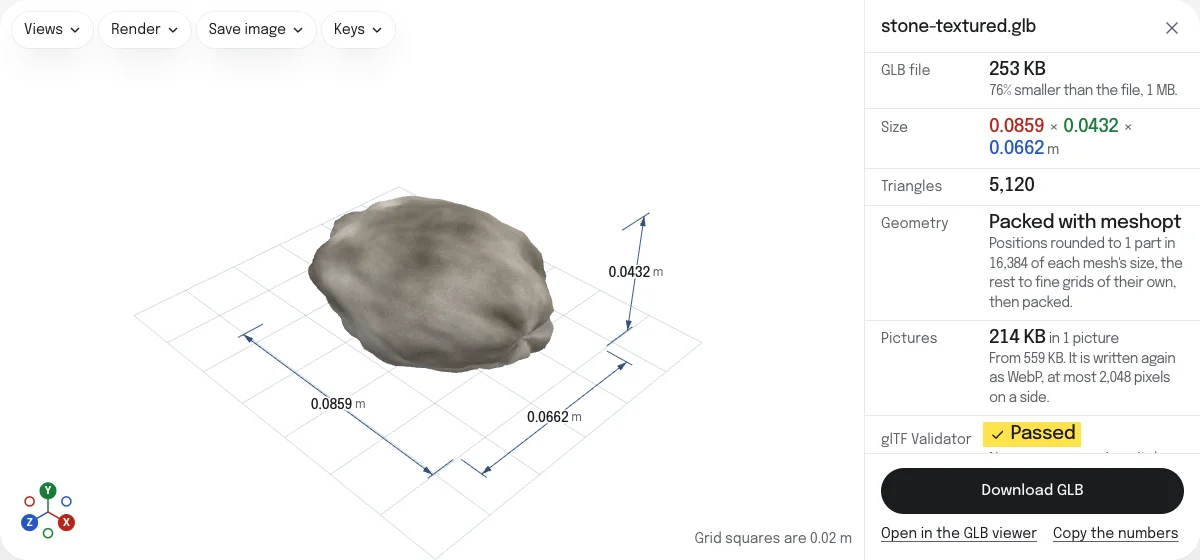
- The model’s size in meters, as glTF is, and its triangles, counted on what is drawn.
Download
Download GLB saves the compressed file, named after yours with “-compressed” added. A glTF with its files comes out as one GLB.
Limits
- Up to 256 MB, with the files a glTF names. A larger file is refused before it is read; glTF-Transform’s own command line, which this page is built on, takes larger files.
- Draco and KTX2 are neither read nor written. A file that uses either is refused before anything is done.
- Pictures are redrawn by the browser. A picture the browser cannot read is kept as it was, and counted.
- No triangles are taken out. For a mesh with more triangles than it needs, Reduce STL file size works on STL files.
Checked with the glTF Validator
The sample stone compressed with the page’s own settings in Chrome, 253 KB from 1 MB with its picture as WebP (WebKit, Safari’s engine, which writes no WebP, gives about 521 KB with JPEG), passes the Khronos glTF Validator 2.0.0-dev.3.10 with no errors and no warnings; the validator notes that it cannot look inside meshopt’s packing, which is why the page reads the geometry back itself. assimp 6.0 refused the same file: it does not read EXT_meshopt_compression. Checked on October 26, 2026. How the tools are tested lists every tool’s file and what opened it.
Questions
Is my file uploaded?
No. The file is read, compressed and checked by your own browser. Nothing is sent to a server, and nothing your file names is fetched: a .gltf's .bin and pictures are looked for among the files you dropped with it, and only there.
What makes it smaller?
Three things. What repeats another, name and all, is kept once, and what no scene uses goes, which changes nothing that is drawn. The geometry is packed with meshopt, after its numbers are rounded to a fine grid. And the pictures, which are most of many files, are brought down to a largest side and written again as WebP or JPEG.
The page gives the size of the GLB you will download beside the size of yours, and what the pictures take before and after.
Will the model look the same?
Nearly. Positions are rounded to one part in 16,384 of each mesh's size, which is a hundredth of a millimeter on a part 16 cm across, and normals, and a mesh's texture coordinates when all of them lie within the picture, to grids of their own, as fine as the eye needs. Packing rounds vertex colors and skin weights to 8 bits too, and an animation's keyframes to a grid of their own. A picture made smaller is less sharp up close, and WebP and JPEG lose a little of it, at 90% quality here. What you see on the page is the compressed file itself, read back by the GLB viewer's own loader.
Which programs open the compressed file?
It uses EXT_meshopt_compression and KHR_mesh_quantization for the geometry, and EXT_texture_webp for WebP pictures. three.js reads all three, and so does this page, which is built on it. Not every program does: assimp 6.0 refused the sample's file packed with meshopt. Before you send the file to another program, check that it reads these extensions; if it does not, untick Pack the geometry with meshopt, or choose JPEG or As they are under Pictures.
Are animations and materials kept?
Yes. Materials, textures, skins, morph targets, animations and material variants are kept, and keyframes that change next to nothing, within a ten-thousandth, are taken out. Packed with meshopt, an animation's keyframes are rounded, as the geometry is. Empty nodes stay, since a game engine may hang something from one.
Does it write Draco or KTX2?
No. tab3d does not read Draco or KTX2 files yet, so it could not show you the result or check it, and it offers nothing it has not checked. A file that already uses either is refused, with what to do.