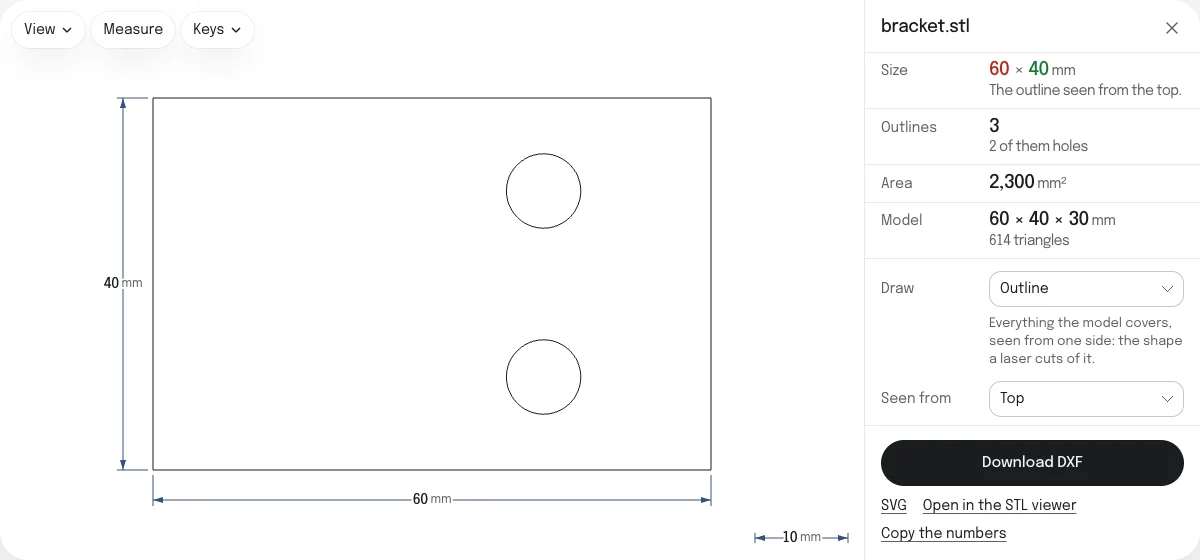
Outline or section
The page draws the model in one of two ways, chosen under Draw:
- Outline: everything the model covers, seen from one side. It is the profile a laser cuts of a flat part, or the footprint of a part on a plate.
- Section: where a flat plane across the model cuts it, at the height you set under Cut at: what is there at that height, holes included.
The sample bracket is a base 60 × 40 × 8 mm with a wall 30 mm tall at one end. From the top its outline is the base, 60 × 40 mm, with the two holes that go through it: three closed polylines. A section from the top at 27 mm is the wall alone, 8 × 40 mm.
Seen from chooses the side: the top, looking down, the front, or the right. A section’s plane faces the same way, and Cut at measures from the model’s lowest point along that side. Changing the side starts the plane halfway through the model again.
How to convert an STL to DXF
- Drop the STL on this page, or choose it with the button. It is read in your browser; nothing is uploaded.
- It is drawn at once with its size marked: as its outline from the top the first time, and after that as you chose last. Choose another side, or a section, beside it.
- Check Size. If the model is 25.4 times too large or too small, it was made in another unit: choose it under Units.
- Choose Download DXF. The file is named after the STL.
The same drawing can be saved as an SVG, for Inkscape, Illustrator or a vinyl cutter, from the link under the button.
What the DXF holds
| In the DXF | |
|---|---|
| Outlines | One closed polyline for each outline and each hole in it |
| Curves | The straight sides of the model's own triangles |
| Layers | OUTLINE or SECTION, in the color that is black on white and white on black. Lines of a section that do not close go on OPEN, in red |
| Unit | Millimeters, or inches for a model in inches or feet. DXF 2000 says so in its header; R12 cannot |
| Place | From the corner of the model's box, so sections at two heights lie one over the other |
| Version | DXF 2000, with light polylines, or R12, with the old kind, chosen under Format |
The drawing on the page is the DXF itself, read back by the same viewer that opens any DXF, so what you check is what is saved. Points of a straight edge that only mark where two triangles met are left out, within a millionth of the model’s size.
Size and units
An STL stores plain numbers and no unit. Slicers and CAD programs read and write them as millimeters, and so does this page to begin with. If the model was made in centimeters, meters, inches or feet, choose that unit under Units. A model in centimeters or meters is written in millimeters; one in inches or feet is written in inches, as a machine set up in inches expects.
Limits
An outline is drawn from up to 5 million triangles, an STL of about 250 MB. A binary STL with more is refused from the count in its first bytes, before it is read. A drawing that takes more than half a second to make again can be stopped.
To check the DXF, measure it or turn it into a PDF, open it in the DXF viewer.
Checked in ezdxf and FreeCAD
The DXF of the sample bracket’s outline from the top passes the audit of ezdxf 1.4.2, an independent DXF library, with no errors and nothing to fix: 3 polylines, in millimeters, 60 × 40 mm from (0, 0). FreeCAD 1.1.4 imports it at the same size. Checked on October 23, 2026. How the tools are tested lists every converter’s file and what opened it.
Questions
Is my file uploaded?
No. The STL is read and the DXF is written by your own browser. Nothing is sent to a server, so a part you are not free to share stays on your device.
What is the difference between the outline and a section?
The outline is everything the model covers seen from one side, as its shadow would be under a light straight above it: a hole that goes all the way through shows, a pocket that stops partway does not. A section is a slice where a flat plane cuts the model, at the height you set, with whatever holes are there at that height.
Will my laser or CNC program read the DXF?
Every outline is one closed polyline, which laser, plasma and router software reads as one cut, with no gaps to join. DXF 2000 is read by nearly everything and says which unit it is in. If a program draws nothing or refuses the file, choose DXF R12 under Format: it is the oldest version still in use, and cannot state its unit, so tell the program it is in millimeters, or in inches for a model in inches or feet.
Are round holes arcs in the DXF?
No. An STL is made of flat triangles only, so a round hole is a polygon with as many sides as the model has around it, and the DXF follows those sides exactly. If the part was drawn in CAD, its STEP or the CAD program's own DXF export has true arcs.
Which side is the top?
The side Z points to, which is up in an STL saved for 3D printing and in most CAD programs. Top looks down on the model, Front looks at it along Y with Z up, and Right looks at it from its right side. A model saved with Y up lies on its back here: its top is what Front shows.
What if the mesh has holes?
The outline is made all the same: it is the shadow of every triangle there is. A section depends on the mesh being closed where the plane cuts it. Where it is not, the cut cannot go round, and those lines are kept as open polylines on a layer of their own, OPEN, in red. Repair the STL first, on the STL repair page, and they close.
Can I go from DXF to STL?
Yes, with the DXF to STL converter on this site. It raises the closed outlines of a drawing into a solid, with every outline inside another as a hole.