What is raised, and what is not
A DXF is a drawing: lines, arcs and circles, each on a layer. A solid needs an inside, so only what goes all the way round is raised.
- Closed outlines are raised over their whole area: a closed polyline, a circle, a closed spline or ellipse.
- Lines and arcs that meet end to end are joined into one outline. Ends count as meeting when they are within a millionth of the drawing’s size of each other: the rounding the drawing’s own numbers leave, and no more. A gap a CAD program would show stays open.
- Line types do not matter. An outline drawn dashed, or in a center line’s dashes and dots, is raised as the outline it is.
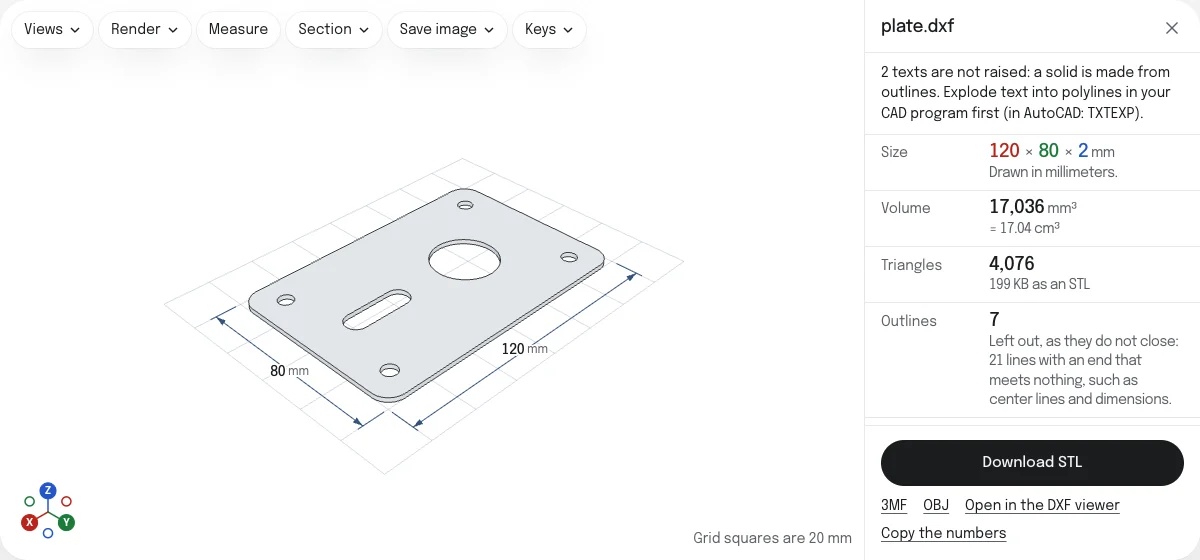
- An outline inside another is a hole in it, and one inside that hole is an island that stands up again. This holds across layers: the plate’s outline on one layer and its holes on another make a plate with holes.
What has no inside is left out, and the page counts it:
- Lines that do not close: center lines, dimensions, construction lines, and a line that stops short of the next.
- Lines where three, or another odd number, meet at one point, which have no one way round. Where four meet, as two squares touching at a corner, they are gone round.
- Text is not raised. Explode it into polylines in your CAD program first.
- Hatches and solid fills are not raised. A hatch’s boundary is, where it is drawn as a line.
Curves are raised as the DXF viewer draws them, in straight pieces every 2.5 degrees in a drawing of up to 30,000 circles, arcs and ellipses: a hole 50 mm across stays within 0.006 mm of the true circle. A drawing of more is cut coarser, every 5 or 7.5 degrees. Blocks are raised where they are placed. The model space is raised, and a layout only when the model space is empty.
How to convert a DXF to STL
- Drop the DXF on this page, or choose it with the button. It is read in your browser; nothing is uploaded.
- It is raised at once, every layer that is not switched off or frozen in the file.
- Check Size. If the drawing came in 25.4 times too large or too small, choose the unit it was drawn in under Units.
- Untick a layer whose outlines should not be raised. Set the Height, and a Base plate or a Bevel if you want one.
- Choose Download STL. The file is named after the DXF.
Height, base plate and bevel
- Height is how far the outlines are raised, from 0.1 to 500 mm. It starts at 2 mm, and is remembered with the height of SVG to STL.
- Base plate puts a rectangular plate under everything, as thick as you set, reaching past the outlines by the margin you set.
- Bevel cuts the top edges off at 45 degrees. It never goes below the ground beside an edge.
A solid of more than 2 million triangles, an STL of over 100 MB, is not made, and the page says so before it starts. A solid that takes more than half a second to make again can be stopped.
The three downloads
| What it holds | |
|---|---|
| STL | One closed solid, in millimeters. For any slicer. |
| 3MF | The same solid in millimeters, with the base plate as a part of its own when there is one. |
| OBJ | The same solid, with the base plate as an object of its own when there is one. |
To look at the drawing first, measure it and check its layers, open it in the DXF viewer. To raise an SVG instead, use SVG to STL, which gives each color a height of its own.
Checked in PrusaSlicer
The STL of the sample plate, opened in PrusaSlicer 2.9.6 on October 23, 2026: 120 × 80 × 2 mm, one part, manifold, with 4,076 facets and a volume of 17,036.5 mm³, which the page rounds to 17,036. How the tools are tested lists every converter’s file and what opened it.
Questions
Is my drawing uploaded?
No. The DXF is read and the solid is made by your own browser. Nothing is sent to a server, so a drawing you are not free to share stays on your device.
What is raised?
Every outline that goes all the way round: a closed polyline, a circle, a closed spline or ellipse, and lines, arcs and open polylines that meet end to end. An outline inside another is a hole in it, and an outline inside that hole stands up again, as an island.
Why are some of my lines left out?
Because they do not close, so there is no inside to raise. Center lines, dimensions, construction lines and a line that stops short of the next one are of this kind. The page counts them under Outlines, and lists beside each layer how many outlines it has. Lines where three, or another odd number, meet at one point, such as a rectangle with a line from corner to corner, are left out too: there is no one way round them.
My holes are on another layer. Are they still holes?
Yes. The outlines of every layer ticked are filled together, so a circle inside the plate's outline is a hole in it whatever layer each is on. Untick a layer to leave its outlines out: a title block's frame, say, which would otherwise make everything inside it a hole.
What happens to text?
It is not raised, and the page says how many texts there are. A solid is made from outlines, and the shapes of letters live in a font. In your CAD program, explode the text into polylines first (in AutoCAD, the Express Tools command TXTEXP), save, and drop the file again.
Is the STL the right size?
Yes, if the DXF says which unit it is drawn in: the STL is written in millimeters from that unit. A DXF that names no unit is read in the unit its measurement setting says (inches or millimeters), and otherwise in the unit chosen last for a file with no unit, millimeters at first: choose another under Units. Check Size before you download. Type a width to scale the outlines; the depth follows, and the height stays as you set it.
Is the STL ready to slice?
It is checked before it is offered, the way the STL viewer checks any file: for open edges and for edges shared by more than two faces. Watertight is marked Yes only when the check finds none. If it says No, the faulty edges are drawn in red on the model.
Can I convert a DWG to STL?
Not directly. DWG is AutoCAD's own format, and no browser tool reads it reliably. Save it as a DXF from the program that made it, or convert it with the ODA File Converter, which is free for non-commercial use, then drop the DXF here.