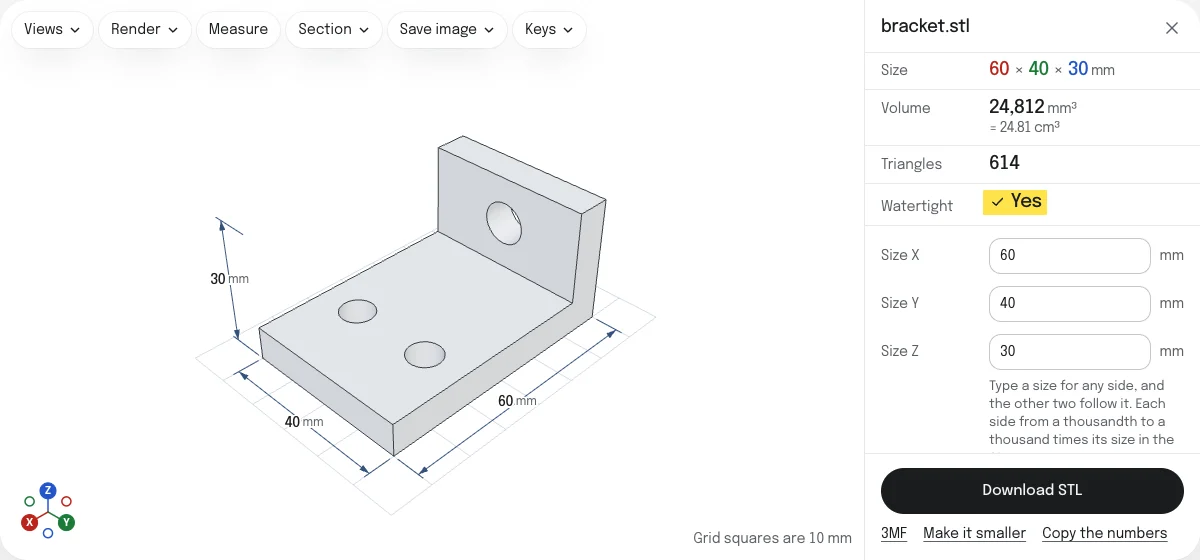
What it does
- Size. Type a size for any side, in the unit the model was drawn in. With Keep proportions on, the other two follow it; off, only that side changes. Each side can be made from a thousandth of its size in the file to a thousand times it.
- Turn. A quarter turn about X, Y or Z, counter-clockwise as you look down the axis. Four turns bring it back.
- Mirror. Left and right changed over along X, Y or Z: the part for the other hand.
- Place. Where the file has it, which keeps the middle of the model’s box where it was; on the bed, with its lowest point on Z = 0 and its middle on X = 0 and Y = 0; or with the middle of its box on the origin.
- Merge. Drop more STL files onto the page and they join the ones open, each where its numbers put it. Each is listed with a way to remove it.
The model on show is the one that is saved, with its size marked on it. Back to the file’s size and turn undoes the size, the turns and the mirrors.
Every file is checked
Each file is checked as it opens, the way the STL viewer checks any file, and Watertight reads Yes only when no edge is open and none is shared by more than two faces. Editing moves the corners and changes no triangle, so what the check found holds for the edited model. With one file open, it can be sent as it came to STL repair, when the check finds it open or facing the wrong way, and to Reduce STL file size, to make it smaller.
Units
STL files hold numbers and no unit. Choose the one the model was drawn in under Units, and the sizes read right and are typed in it. The STL and the 3MF are written in millimeters, the unit slicers read an STL in, so a model drawn in inches comes out 25.4 times its numbers: the size it was meant to be.
The two downloads
- Download STL saves the edited model as a binary STL in millimeters, every file merged into one mesh, each triangle as its file has it, named after the first file with “-edited”, or “-merged” for several.
- 3MF saves the same model in millimeters with each file a part of its own, named after its file. It names each corner once, leaving out triangles of no area.
Limits
- Up to 5 million triangles, the files together. A larger binary file is refused from its header, before its triangles are read; a text file once it is read. Reduce STL file size makes a file smaller first.
- Colors are not kept. Some programs write a color for each triangle of a binary STL; the edited files have none.
- Turns are quarter turns. The slicer rotates by any angle.
- The model is not cut. Cutting a part too large for the bed into pieces is a job for the slicer’s cut tool, or for a mesh editor such as Blender.
- Merged files are not joined where they cross: each stays a closed shell of its own, and the slicer joins them when it slices.
Checked in PrusaSlicer
The STL of the sample bracket as it opens, opened in PrusaSlicer 2.9.6 on October 26, 2026: 60 × 40 × 30 mm, one part, manifold, with 614 facets and a volume of 24,811.5 mm³. A unit test holds the same bracket typed to 120 mm long to 120 × 80 × 60 mm, closed, with eight times the volume. How the tools are tested lists every tool’s file and what opened it.
Questions
Is my file uploaded?
No. The STL is read, edited and written again by your own browser. Nothing is sent to a server.
How do I make a model a given size?
Type the size you want for any side under Size X, Size Y or Size Z, and press Enter. With Keep proportions on, the other two sides grow or shrink with it, so a bracket 60 mm long typed to 120 mm becomes 120 × 80 × 60 mm. With it off, only that side changes, and the model is stretched or squashed along it.
Scale does the same for every side at once, in percent.
My model is tiny in the slicer. Can this fix it?
Most likely the model was drawn in inches, or in meters, and the slicer read its numbers as millimeters. Choose the unit it was drawn in under Units: the sizes then read right, and the STL is written in millimeters, so a part drawn 2 inches long comes out 50.8 mm long.
Can I rotate by any angle?
Here a model turns a quarter at a time about X, Y or Z, which is what laying a part on another side takes, and its size stays exact. Any other angle is a job for the slicer, which rotates a part on its plate by the degree.
What happens when I merge files?
Each file keeps the place its own numbers give it, as parts exported from one assembly do, and every edit moves them together. The STL holds all of them as one mesh; the 3MF holds each file as a part of one object, named after its file and in its place. Files that cross each other are not joined into one solid: the slicer does that when it slices.
Does editing change the shape of my model?
No more than you ask. The STL keeps every triangle of the file, moved, and none is added. A mirrored model has its triangles turned over, so that they still face out and the slicer still sees a solid.
The 3MF names each corner once, so a triangle whose corners meet in one place, which has no area, is left out of it. The colors some programs write into a binary STL are not kept in either file.