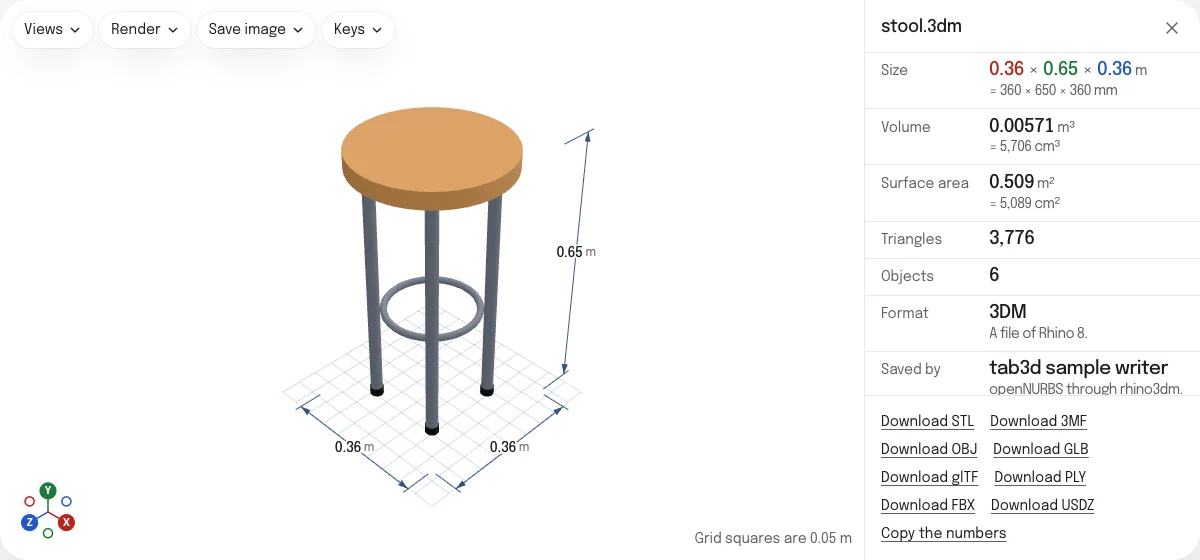
What the viewer shows
The model in the colors of its materials, or of its objects and layers where it has no material, standing up as Rhino stands it. Beside it are the numbers the STL viewer gives any mesh: its size, its volume and area, its triangles and objects, and whether it is closed, which a model to 3D print has to be.
Under them is what the file says of itself:
- Format: the version of Rhino whose file it is.
- Saved by: the program that saved it, as the file says.
- File unit: the unit the file states, which its numbers are read in.
- Layers: each with its color, the number of objects on it and a switch. Layers nest as they do in Rhino, and a layer the file has switched off starts off and says so. Only this shows one layer, with the layers it is in and those in it.
- Objects, by layer: each with its name, or its kind where it has none.
The sample is a bar stool, drawn in millimeters on nested layers: a seat of three faces, four legs placed as a block, each an extrusion on its foot, a footring as a mesh, and a cushion on a layer the file switches off.
Render meshes, and a file saved small
openNURBS reads every surface of a 3DM exactly, but a browser draws triangles, and making triangles of a trimmed surface is the work of Rhino’s own mesher, which openNURBS does not include. Rhino keeps the meshes it draws a model with in the file it saves, and this viewer shows those. A file saved with Save small, or written by a program that leaves them out, has none: the page says so, with what to do in Rhino, and still shows the meshes, the SubDs and the objects that have one. A SubD is meshed here, from its control net.
What is read, and what is not
Polysurfaces, surfaces, extrusions, meshes and SubDs are drawn, and blocks are placed as often as the file places them, blocks inside blocks too. Curves, points, point clouds, text, dimensions, hatches and lights are counted and not drawn. An object the file hides is not drawn, as Rhino does not draw it. A model placed far from its origin, as a building on a survey’s coordinates is, is moved near it and the page says by how much, since a mesh so far out would lose its millimeters.
Saving it
What is on show saves as an OBJ with each object named and its color in a material file, as an STL or a 3MF in millimeters to 3D print it, as a GLB or glTF for the web and game engines, and as a PLY, an FBX or a USDZ. Surfaces are saved as the triangles of their render meshes: for a STEP of the exact surfaces, export one from Rhino and open it in the STEP viewer.
Questions
Is my file uploaded?
No. The 3DM is read by your own browser, with openNURBS, Rhino's own library for its files, which the page loads from tab3d.com the first time a 3DM is opened. Nothing of the file is sent anywhere.
Why does my file show nothing?
Rhino draws a surface or a solid through a mesh it makes of it, its render mesh, and keeps that mesh in the file unless it is saved small. This viewer shows a 3DM through those meshes, and a file saved without them has none to show. In Rhino, set a viewport to Shaded so the meshes are made, then choose File, Save As with Save small turned off, and open the new file here.
Which versions of Rhino open here?
Files of Rhino 2 to Rhino 8. A file of a newer Rhino is said to be so: save it from Rhino as a Rhino 8 file to open it here.
Why is the size in meters?
A 3DM states its unit, most often millimeters. The viewer shows every model in meters, standing on Y, as it shows GLB, glTF and FBX files, so files of each kind can be opened side by side and measured alike. The unit the file states is under File unit, and the size is given in millimeters beside it.
What about curves, text and dimensions?
They are not drawn: the viewer shows surfaces, solids, meshes and SubDs, and the panel counts what it leaves out. A drawing of curves exported from Rhino as a DXF opens in the DXF viewer.
Can I save it as OBJ or STL?
Yes, with the links under the numbers: an OBJ with each object named, an STL or a 3MF in millimeters to 3D print, a GLB, glTF, PLY, FBX or USDZ. What is saved is what is on show: a layer switched off is left out of the file.