What you get
A STEP file with a solid for each object of the project: parts a CAD program can measure, cut and fit against your own design, not a picture of them.
Each object stays where the plate has it, and the file is in millimeters, whatever unit the 3MF was written in. Every flat region of the mesh becomes one flat face, as on STL to STEP: a cube of 12 triangles comes out as 6 faces, and a bracket with thousands of triangles on its flat sides comes out with a face per side. Each solid is checked by the CAD kernel before you download it.
What is converted
What is converted is what the slicer would print, as 3MF to STL saves it.
- Plates and objects. They are listed as in the slicer, each with a checkbox. Objects the project marks as not printable start unticked.
- Parts. An object made of several parts becomes an assembly of them in the STEP, each part a solid of its own with its own name and color.
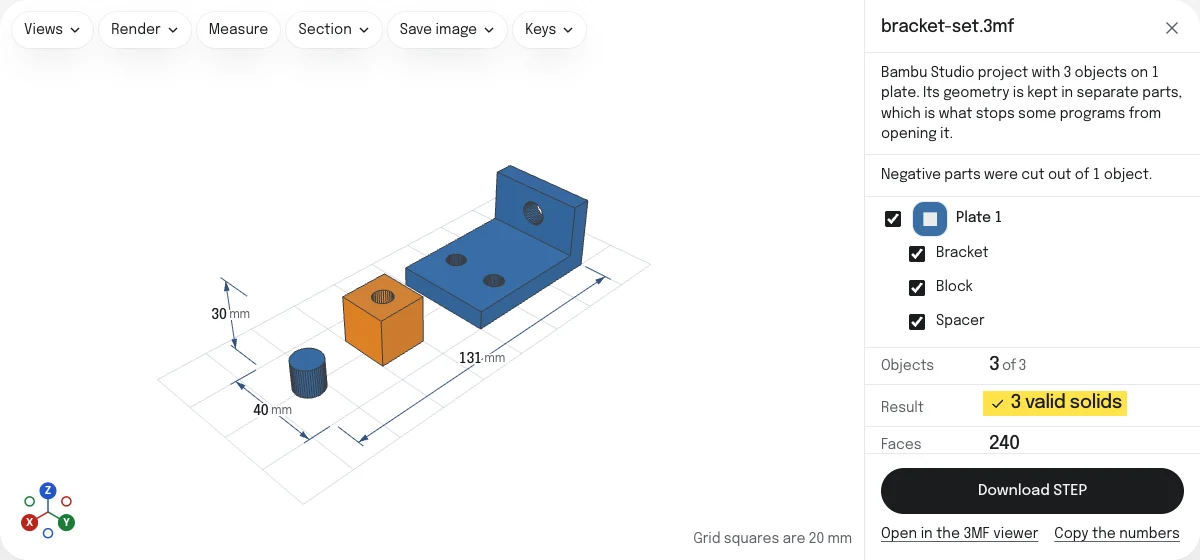
- Negative parts are cut out of their object, so a hole made with one is a hole in the solid. The object is then one solid, named after it, in the color its parts share where they share one.
- Modifiers and support parts are left out. They are print settings, not geometry, and the page says how many there were.
Objects are never joined to each other. Two that touch on the plate stay two solids, as they are two things in the slicer.
Names and colors
The STEP is an assembly named after the file, with a part for each object, named as the project names it, or an assembly of its parts where it has several. A project of one object is that object on its own: a part, or an assembly named after the object.
A part is written in the one color all of it has: its filament’s, or the color the 3MF gives every one of its triangles. Two things are left out, and the page says so when it finds them:
- Painting. A brush stroke in Bambu Studio or PrusaSlicer cuts across the faces that flat triangles merge into, and a STEP colors a whole solid or a whole face. A painted part is in its filament’s color.
- Colors that change across a part. A part whose triangles the file gives several colors is written without one.
What you don’t get
- True curves. Cylinders, fillets and spheres stay as the flat strips the mesh has. The solids are exact to the mesh, not to the design the mesh came from.
- A feature tree. There are no sketches, extrusions or dimensions to edit.
- Print settings. Layer height, infill and supports belong to the slicer. A STEP holds only shapes.
When a project is too large
The limits are those of STL to STEP, held to every object chosen together, and each is stated before the wait. Above 25,000 faces after merging, the page gives the number of faces and the size of the file they would make, and offers to simplify the mesh first: each part keeps its share of about 20,000 triangles, by the triangles it had, and the page says how far the surface moved. A project of more than 2 million triangles has to be simplified before anything else. Choosing fewer objects does the same for the rest.
Options
- Merge flat faces. On by default. Switch it off to keep one face per triangle.
- Flatness. How far from a plane triangles may be and still count as one face. The automatic value suits clean meshes.
- Extension. The file can end in .step or .stp. Either way it is STEP AP214, which every current CAD program reads.
Other ways to do it
The slicers do not save STEP. Bambu Studio 2.8 exports a model as 3MF or STL, OrcaSlicer 2.4 as 3MF, STL or Draco, and PrusaSlicer 2.9 as 3MF, STL or OBJ. The usual route is to export an STL and convert it with STL to STEP, which leaves the names and colors behind, and the objects in one mesh.
FreeCAD 1.1.4 opens a 3MF as a mesh, but as one mesh for the whole file: the sample project comes in as 946 triangles, its three objects together and its negative part as a cylinder of its own, not as a hole.
Checked in FreeCAD
The STEP of the sample project, opened in FreeCAD 1.1.4 on October 28, 2026, is 3 valid solids of 240 faces, the check behind “Check Geometry” finds no errors in them, and their volume is 33,165.95 mm³. FreeCAD’s STEP importer names the parts Bracket, Block and Spacer, in an assembly named bracket-set. How the tools are tested lists every converter’s file and what opened it.
Questions
Does the STEP keep the names and colors?
Yes. Each object is a part named as the slicer names it, or an assembly of its parts where it has several, and the objects of a project of several are held in an assembly named after the file. A part is in its filament's color, or in the color the 3MF gives its triangles where it gives all of them one.
Painting is not kept. A STEP colors a whole solid or a whole face, and a brush stroke follows neither, so a painted part comes out in its filament's color and the page says so.
Will a Bambu Studio or MakerWorld project work?
Yes. The file is read by the same reader as 3MF to STL: projects from Bambu Studio, OrcaSlicer and PrusaSlicer, with their plates, and any other 3MF. Modifiers and support blockers are left out, since they are print settings, and negative parts are cut out of their objects, so a hole made with one is a hole in the solid.
Why are curves still faceted?
A 3MF holds flat triangles, as an STL does. A round hole is a ring of flat strips, and nothing in the file says it was ever round, so it stays as many-sided as the mesh has it. Flat areas are different: many triangles in one plane really are one face, and they are merged into one.
What's the maximum size?
The limit is on faces after merging, for every object chosen together: 25,000. A project of mechanical parts with mostly flat faces converts in seconds. A sculpted or scanned shape keeps a face for almost every triangle.
Above 25,000 faces the page offers to simplify the mesh first, each part by its share of the triangles, and tells you how far the surface moves. A project of more than 2 million triangles has to be simplified before anything else. You can also choose fewer objects.
Is my file uploaded?
No. The 3MF is read by your browser, and the STEP is made by OpenCascade, the geometry kernel behind FreeCAD, running inside it. The kernel is a large download the first time, around 6 MB when compressed, and the browser keeps it afterwards.