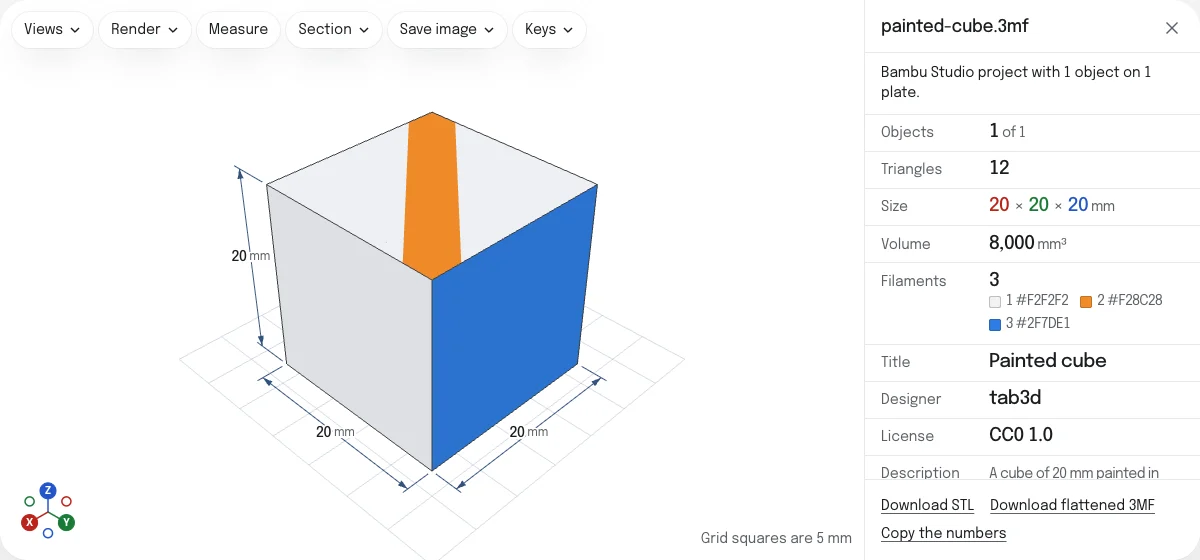
What the viewer shows
Every object of the project, placed where the project placed it, in millimeters. When the slicer recorded plates, the objects are listed plate by plate with the plate’s own picture, each with a checkbox; untick one to take it out of the view and of the numbers. An object the project marks as not printable is listed and left unticked.
The numbers are of the objects ticked: how many, their triangles, their size, and their volume, which is marked unreliable when a mesh is not closed. Then the Filaments they are printed with, each with its color, and what the model says of itself: its Title, Designer, License and Description.
The colors
A 3MF can give a model its colors in three ways, and the viewer reads all three:
- Painting. Bambu Studio, OrcaSlicer and PrusaSlicer let you paint a model with a brush, in any of the filaments. A painted triangle is cut into smaller ones, as finely as the brush needs, and each of those is painted. The viewer cuts the triangles the same way, so a stripe painted across a face is drawn where it was painted.
- Filaments. Each object, and each part of an object, is printed with one filament, and the project’s settings give each filament a color. Where nothing is painted, a part is drawn in its filament’s color.
- The colors of the format. The 3MF specification gives a triangle a color through base materials and color groups. A 3MF written by a program other than a slicer is drawn in those.
What is not drawn: textures (the Materials Extension’s picture groups), the painting of supports and seams, which marks where they go and is not a color, and the settings of modifiers.
What is left out, and what is cut
Modifiers, support blockers and enforcers are left out of the view, and the page says how many: they are print settings, not geometry. A negative part, which takes material away, is cut out of its object, and the object is drawn in the filament of its first part, since cutting makes triangles that are none of the file’s.
Saving
The links under the numbers save the objects ticked as one STL, one STL per object or per plate in a ZIP, or a flattened 3MF that every slicer opens. None of them keeps the colors. 3MF to STL says what each keeps and loses.
The sample is a cube of 20 mm laid out as Bambu Studio writes a project: printed in white, with a stripe painted across its top in orange and its back painted in blue.
Questions
Is my file uploaded?
No. The project is read by your own browser, on your device. A 150 MB project opens without a wait in a queue, because it is never sent anywhere.
Why does a MakerWorld project open here when another viewer shows nothing?
Bambu Studio and OrcaSlicer keep each object of a project in a part of its own inside the 3MF, and the main part only points to them. A viewer that does not follow the pointers finds no geometry. This one follows them, on objects and on build items alike.
Are the colors the ones my slicer shows?
They are the colors the project's settings give each filament, on the parts and the triangles the project gives that filament, and the triangles painted in it, cut as the slicer cuts them. A slicer shows the same filaments. What it shows of the light and the shading is its own.
Why is part of my model gray?
Nothing in the file gives it a color: the project names no filament for it, or names one its settings give no color to. A 3MF from a program other than a slicer has colors only where it writes base materials or color groups.
Why is a part missing?
Modifiers, support blockers and support enforcers are print settings, not geometry, and are left out; the page says how many. A negative part is cut out of its object, which is then drawn in its first part's filament.
Can I see the sliced plate?
A 3MF sliced by Bambu Studio or OrcaSlicer, a .gcode.3mf, holds G-code and opens in the G-code viewer, where you step through its layers. A project that has not been sliced opens here.
Can I save it with its colors?
Not from here. An STL has no colors, and the flattened 3MF holds the geometry alone. The project itself keeps its colors: open it in its slicer.